1. What’s New
MPP 6.8
- Improve StartTLS security
-
Peer verification algorithms have been improved to make StartTLS connections more robust.
| There may be situations where some authenticators that were previously able to successfully connect to an LDAP or AD server may no longer be able to do so. In most cases, this is the reason because an IP has been specified instead of the fully qualified domain name. |
- SMS Flood Prevention
-
A defined time window preset to 1 minute, in which the MPP prevents an SMS from being sent multiple times to the same number and IP address.
The what’s new archive can be found here.
2. Configuration
2.1. Administration
2.1.1. Manage Config
Navigation: Administration | Manage Config
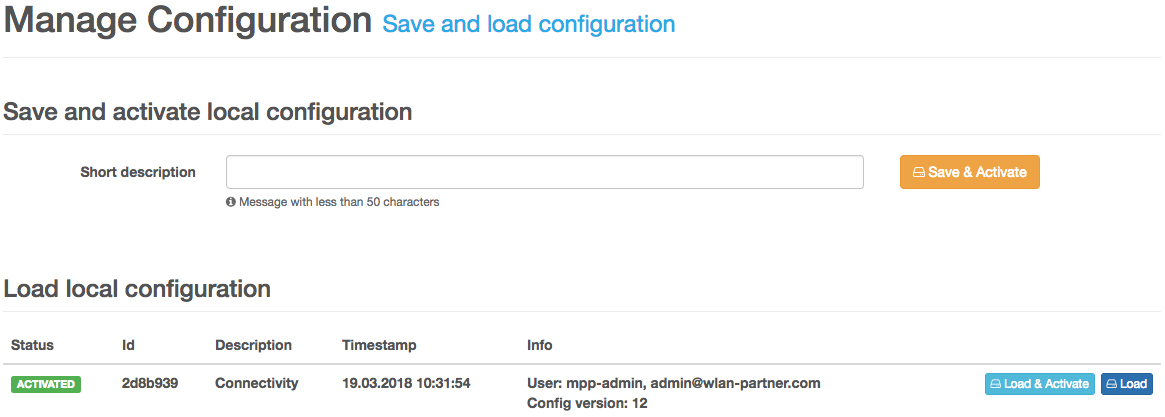
The MPP’s configuration management is based on GIT. Therefore every configuration revision has an unique id assigned. To save the current configuration enter a short description and click the button Save & Activate. After the configuration has been applied you see the new revision in the table underneath. To load a previously applied configuration, you have two options. First, you have the ability to just load the configuration by clicking Load. In this case, you can modify or view the desired configuration and may activate it afterward by pressing Save & Activate. The second option is to press Load & Activate. The latter will keep the configuration activated until the next reboot.
2.2. Network Access
2.2.1. Templates
Navigation: Network Access | Template Bundles
The MPP uses Mustache to compile the templates.
Variables
| Name | Description |
|---|---|
|
Dotted decimal formatted IP address of the client, eg. |
|
Hyphen delimited MAC address of the client, eg. |
|
Mobile phone number. Only available during the SMS authentication process. |
|
Name of the site, where the client is online |
|
The name of the customer to whom the session belongs |
|
The name of the profile to which the session belongs |
|
Fully-qualified domain name of the serving MPP |
|
ID of the session |
|
Intercepted URL of the client |
|
Fully-qualified domain name of the landing page URL |
|
The session’s end time. May be |
|
Numerical representation of an error. May be |
|
A textual representation of an error. Not localized and may be |
|
Remaining upload amount in a human readable format. Only available if a Metered Device Authenticator with metering mode Traffic exists. |
|
Remaining download amount in a human readable format. Only available if a Metered Device Authenticator with metering mode Traffic exists. |
|
The name of the tag. May be |
|
Signed JSON Web Token (JWT). The customer’s shared secret is used to sign the message. |
|
Hashed Username. Only available if the customer has a shared secret configured. |
|
Hashed MAC address. Only available if the customer has a shared secret configured. |
|
Token to prevent cross-site request forgery (CSRF) attacks. |
Authentication Error Codes
| Code | Default Message | Description |
|---|---|---|
0 |
OK |
- |
1 |
Internal Server Error |
Will be returned if the MPP could not fulfill the request or could not reach the authentication server. |
2 |
Invalid credentials |
Returned if no configured authentication server is responsible for this type of authentication or if the specified credentials were invalid. |
3 |
Terms not accepted |
The responsible authenticator requires the user to accept the terms and conditions. |
4 |
Invalid mobile number |
The provided phone number is not valid. |
5 |
Concurrent session limit reached |
The configured session limit has been reached and the Concurrent Login Limit Policy has been set to Reject. |
6 |
Account locked |
The account for the provided credentials is locked. An account can be blocked by the MPP itself if it detects a bad behavior. |
7 |
Account disabled |
The user account found by the authenticator is disabled. An account can only be disabled by a human being. |
8 |
Account expired |
The user account is currently not valid. |
9 |
SMS provider unavailable |
The SMS could not be sent. |
10 |
Session not found |
Will be returned if no session was found. |
11 |
Invalid security token |
Returned if the specified security token was not valid. |
12 |
Authentication timeout |
The timeout for authentication has been reached. |
13 |
Max authentication retries reached |
Will be returned if a Failed Retries Authenticator is in place and the client has reached the configured maximum retry attempts. |
To check for an error, you can use the variable error_code_<error code>, eg. error_code_2. An error handling block
may look as follows:
{{^error_code_0}} (1)
<strong>Error!</strong>
{{#error_code_1}} (2)
Internal Server Error
{{/error_code_1}} (3)
{{#error_code_2}} (4)
Invalid Credentials
{{/error_code_2}} (5)
{{/error_code_0}} (6)| 1 | Checks that an error has occurred and therefore "error" code 0 is not set |
| 2 | Checks if error code 1 is set |
| 3 | End marker for error code 1 check |
| 4 | Checks if error code 2 is set |
| 5 | End marker for error code 2 check |
| 6 | End marker for error code 0 check |
Web Forms
| Field Name | Description |
|---|---|
|
Contains the username. Used by login templates. |
|
Provides the password. Used by login templates. |
|
If present, the MPP assumes that the client has accepted the terms and conditions. |
|
Intercepted URL. If present and no redirect URL is configured on the current site, the client will be redirected to this URL on successful authentication. |
|
Contains the phone number. Used by SMS registration templates. |
|
Contains the security token. Currently used by the SMS validation templates. |
|
Provides the tag. If present and the given tag is configured as Tagged Redirect URL, the client will be redirected
to the configured URL on successful authentication. This mechanism is more secure than using the |
|
Contains the CSRF token. Usually rendered as hidden field, eg. |
|
Contains the voucher code. Currently only supported by the SMS registration templates. |
Links
| Parameter Name | Description |
|---|---|
|
Key to identify a resource. Mainly used by Route Authenticator to decide if it is responsible for authentication or not. |
|
Requests the page with the given language, eg. |
|
Provides the session ID for consecutive requests. May speed up the session ID lookup process. |
|
Intercepted URL. If present and no redirect URL is configured on the current site, the client will be redirected to this URL on successful authentication. |
|
Provides the tag. If present and the given tag is configured as Tagged Redirect URL, the client will be redirected
to the configured URL on successful authentication. This mechanism is more secure than using the |
|
Contains the CSRF token. Required by the Route Authenticator when CSRF prevention is enabled. |
|
If present, the MPP assumes that the client has accepted the terms and conditions. |
Endpoints
| Path | Method | Description |
|---|---|---|
|
GET |
Used internally to serve templates. |
|
POST |
Use this URL to authenticate the user with the specified Web form fields. |
|
GET |
Ends the current client session. If CSRF prevention is enabled, you must specify the template bundle Template Bundle (Logout) in the customer configuration. |
|
GET |
Sets the language of the current session. Requires at least the GET parameter |
|
GET |
Navigate to the template bundle with the given key provided by the GET parameter |
|
GET |
Authenticates the client session with the key specified by the GET parameter |
|
GET |
Shows debug information of the current client session. If CSRF prevention is enabled, you must specify the template bundle Template Bundle (Debug) in the customer configuration. |
|
GET |
De-registers the current client device from the user account. If CSRF prevention is enabled, you must specify the template bundle Template Bundle (Device de-association) in the customer configuration. |
|
GET |
Shows device information such as user group and mark information. See MPP Client API |
|
POST + DELETE |
Remote session manager API to start and stop MPP client sessions. See MPP Client API |
2.2.2. Sites
Navigation: Network Access | Sites
Presence Mode
The presence mode decides how user sessions are started and stopped. It can be configured per site.
Presence Mode DHCP
This is the standard presence mode. In DHCP mode, a user session is started when a valid DHCP lease is detected and stopped when the lease expires.
Presence Mode Traffic
In this mode sessions are managed manually via the client API.
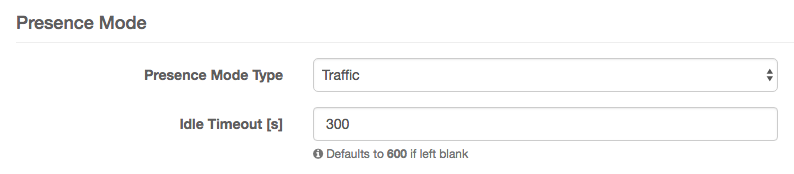
- Idle Timeout
-
Number of seconds after which a session is automatically terminated if no traffic is detected. A default value can be configured per customer (System | Customers).
2.2.3. API Access
Navigation: Network Access | API Access
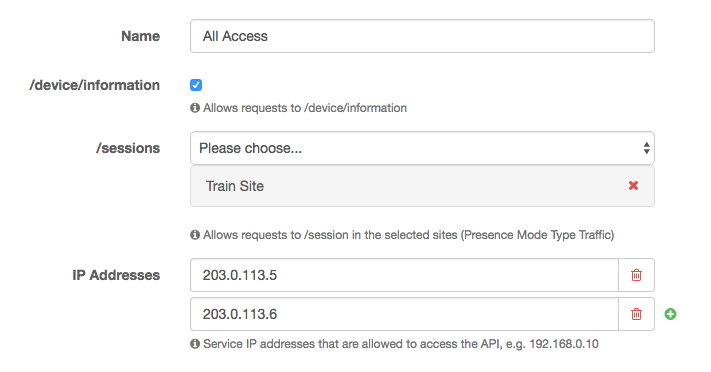
- Name
-
Name of the API access configuration.
- /device/information
-
Allowed to access the device information.
- /session
-
Allowed sites of presence mode type traffic, to start and stop sessions.
- IP addresses
-
List of IP addresses that are allowed to access the API.
3. Administration
3.1. Upgrade
After you’ve upgraded your MPP installation you need to check that the MPP still runs by issuing the command
systemctl status mpp. The line starting with Active must be active (running). If this is not the case, try to start
start the MPP with systemctl start mpp. We recommend that you restart the operating system after each upgrade. If you
do so, you’re sure that everything works fine.
|
To upgrade a redundant installation you should first update your backup system. After the backup system is back online and its state switched to backup, you should enable the Maintenance Mode on the master system. You can enable the Maintenance Mode at Administration | System Admin. Once you’re done with the upgrade process on the master, you must manually disable the maintenance mode.
3.1.1. Upgrade MPP >= 5.5.0
apt update (1)
apt upgrade (2)
apt autoremove --purge (3)| 1 | Update the local package information database |
| 2 | Install all available upgrades of all packages currently installed on the MPP |
| 3 | Remove packages that are no longer needed by the system |
3.1.2. Upgrade MPP < 5.5.0
-
Perform Ubuntu release upgrade from 14.04 to 16.04
apt-get update (1)
apt-get dist-upgrade (2)
apt-get install zulu-8 java-common (3)
exit (4)
sudo -i
apt-get install update-manager-core (5)
do-release-upgrade (6)
  Continue running under SSH? → Y
  Do you want to rewrite your 'sources.list' file anyway? → Y
  Do you want to start the upgrade? → Y
  Configuring sysstat: Remove old format statistics data files? → Yes
  DHCP Relay: Servers the DHCP relay should forward requests to: → _
  DHCP Relay: Interfaces the DHCP relay should listen on: → _
  DHCP Relay: Additional options for the DHCP relay daemon: → _
  Postfix Configuration: General type of mail configuration: → No configuration
  Configuring libc6: Do you want to upgrade glibc now? → Yes
  Configuration file '/etc/bash.bashrc' → Y
  Configuring libssl: Restart services during package upgrades without asking? → Yes
  Configuring postgresql-common: Please see /usr/share/doc/postgresql-common/README.Debian.gz for details. → Ok
  Configuring postgresql-common: What do you want to do about modified configuration file createcluster.conf? → install the package maintainer's version
  Configuration file '/etc/default/snmpd' → N
  Configuration file '/etc/snmp/snmpd.conf' → N
  Configuration file '/etc/security/limits.d/90-nofiles.conf' → Y
  Configuration file '/etc/dhcp/dhcpd.conf' → N
  Configuration file '/etc/ntp.conf' → N
  Configuration file '/etc/nginx/sites-available/default' → N
  Configuration file '/etc/nginx/nginx.conf' → N
  Configuring grub-pc: Continue without installing GRUB? → No
  Configuring grub-pc: GRUB install devices → Primary disk, eg. /dev/sda
  Configuration file '/etc/sysctl.d/30-mpp.conf' → Y
  Remove obsolete packages? → Y
  System restart required → Y
1 Update the local package information database 2 Install all available upgrades of all packages currently installed on the MPP 3 Install Java common package 4 Exit and restart new root bash-session 5 Install the update manager 6 Perform the release upgrade from Ubuntu 14.04 to 16.04 -
Cleanup new system and finish release upgrade
apt purge postgresql-9.3 postgresql-client-9.3 mpp-sioux (1)
apt autoremove --purge (2)
1 Remove previously used Postgres packages 2 Remove packages that were automatically installed to satisfy dependencies for other packages and are now no longer needed
3.2. Network Recovery
If the MPP is unable to start and the whole network configuration is gone, you can configure the network by invoking
systemctl start network-setup on the machine’s command line interface.
3.3. Certificate Signing Request (CSR)
To obtain a certificate either for the management console or the landing page you must first create a CSR. The simplest way to create such a request is on the MPP command line itself.
-
Connect to the MPP by SSH
ssh -l mpp-admin HOST -
Create and change directory
mkdir mpp.example.org cd mpp.example.org -
Create configuration file
With the following configuration file we request a certificate with two domain names:
mpp.example.organdmpp.example.com.cat <<EOF >mpp.example.org.cnf [ req ] default_bits = 2048 prompt = no default_md = sha256 distinguished_name = req_dn req_extensions = req_ext [ req_dn ] countryName = CH stateOrProvinceName = Zurich localityName = Zurich organizationName = CloudGuard Software AG commonName = mpp.example.org [ req_ext ] subjectAltName = @alt_names [alt_names] DNS.1 = mpp.example.org DNS.2 = mpp.example.com EOF -
Create CSR with a newly generated key
openssl req -new -newkey rsa -nodes -keyout mpp.example.org.key -out mpp.example.org.csr \ -config mpp.example.org.cnf -
Verify the request
Check at minimum the Subject and the requested Subject Alternative Names.
openssl req -text -noout -in mpp.example.org.csr -
Let your CA sign your request
mpp.example.org.csrRequest the certificates in a PEM-encoded format like.
3.4. VMware Tools
If you are running the MPP in a VMware virtual environment, you should install the tools to run the MPP smoothly and optimally integrated.
apt update
apt install open-vm-tools
3.5. Logging
Any log files generated by the MPP are in /var/log/mpp. To change the configured log level, you need to adjust the
configuration in /etc/mpp/logback.xml or /etc/mpp-system-agent/logback.xml respectively. More information about the
logging framework Logback can be found here.
accounting.log-
The MPP logs all session start and end messages in this file. It is rotated daily and keeps the archive of the last 30 days. The log level is INFO by default.
console-audit.log-
Log file with every authentication attempt for the MPP console. It is rotated monthly and keeps the archive of the last 4 months. The log level is INFO by default.
mpp.log-
This ist the main log file and therefore makes a lot of noise. It is rotated after 250 MB and keeps the last 7 archived files. The log level is INFO by default.
session.log-
Log file that contains session-related information, such as bad authentication attempts. It is rotated after 250 MB and keeps the last 3 archived files. The log level is WARN by default.
sync.log-
If you have synchronization issues, this file is your friend. It is rotated after 250 MB and keeps the last 3 archived files. The log level is INFO by default.
system-agent.log-
If the MPP was unable to activate your configuration, you should look at the entries here. It is rotated after 250 MB and keeps the last 7 archived files. The log level is INFO by default.
3.6. Daemons
3.6.1. Lawful Interception Daemon
LINDA (Service name: mpp-linda) is the new Lawful Interception Daemon. It writes a binary logfile for each
day stored in /var/log/mpp/li-*.log. To read such a binary file we provide a small utility called linda-parse that
reads from stdin and writes to stdout. With the command cat /var/log/mpp/li-*.log | linda-parse you can read any
Lawful Interception file and print it in a human readable form.
3.6.2. Snoopy
Snoopy (Service name: mpp-snoopy) replaces Sioux’s DHCP snooping capabilities 1:1. It captures any DHCP traffic that
flows through the MPP and sends the captured information to the MPP.
3.6.3. Netmaid
The Netmaid Daemon (Service name: mpp-netmaid) is responsible for the whole Kernel communication and provides an
interface to configure various parts of the Linux networking stack such as IPtables, setting IP addresses and alter its
network routes.
4. Installation
4.1. System requirements
| Component | Minimum | Recommended |
|---|---|---|
Processor |
Quad core with 2 GHz or faster |
Hexa core with 2 GHz or faster |
RAM |
6 GB |
8 GB, no more than 12 GB |
Storage |
120 GB |
>= 260 GB |
NIC |
2x1 Gb/s |
3x1 Gb/s for Uplink, Client networks and Management |
The MPP runs on VMware vSphere 6 or later and on any modern hardware (Bare metal) that is supported by Ubuntu Linux 16.04 LTS with Linux Kernel 4.4.
4.2. Example Setup
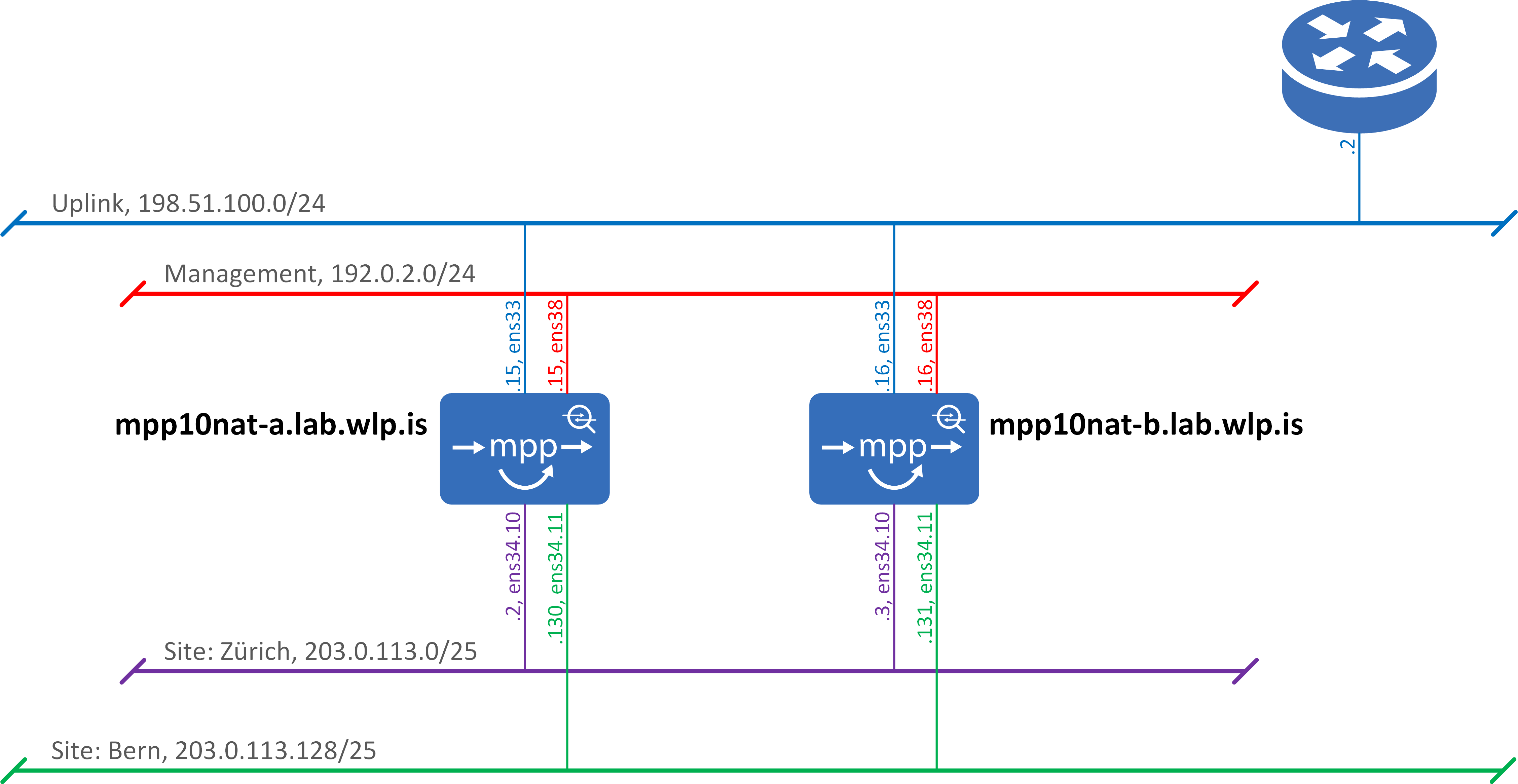
In this section, you will learn how to install a redundant MPP with the following requirements:
-
Employees authenticate themselves against the company’s LDAP directory during their first use and get an auto session without any authentication afterward.
-
Any other user uses the SMS self-registration process. If the authentication was successful, the registration is valid for 180 days and the user shall visit the welcome back page only once a day.
4.2.1. Network Topology
| What | IP address |
|---|---|
Landing-Page URL |
|
Site: Zurich |
203.0.113.1 (VRRP) |
Site: Bern |
203.0.113.129 (VRRP) |
Service IP address (DNS, DHCP Server) |
185.12.129.33 |
External DNS |
8.8.4.4 (primary) |
4.2.2. Boot from image
To install the MPP, we need either a bare metal server or a virtual machine that meets the requirements as specified here.
Download the latest CloudGuard ISO from https://packages.cloudguard.ch/iso/.
After you have started from the disk image the following GRUB screen will show up:
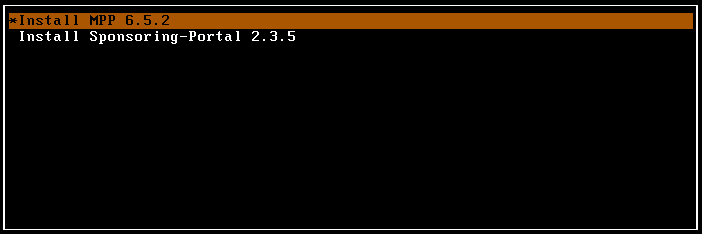
Select Install MPP 6.8.2 and press return. As next, the setup wizard pops up. Follow the instructions and configure the management access. Next, to the wizard, the MPP gets installed on the local disk. This may take five to ten minutes. To finish the installation the server reboots once, and a yellow Linux prompt appears.
During the first start of the MPP, the system gets initialized. This can take up to another five minutes, so be patient. Once the MPP was started successfully the management console should be accessible via https://mpp01.example.org:1443/. The username and password of the admin user are mpp-admin. If you cannot log in to the Linux console, the initialization process may not have finished yet. Just wait a moment and try again.
| After a successful installation, there will be a message in the top right-hand corner, saying that a system restart would be required. Just ignore this advice for now. |
After accepting the End-user license agreement (EULA), you will be asked if you either want to run the MPP as MPP Cluster Coordinator (MPP CC) or as standalone MPP. If you have no clue what an MPP CC does, it would be wise not to select the checkbox.
4.2.3. Customer setup and login
Every MPP installation needs at minimum one customer as shown below:
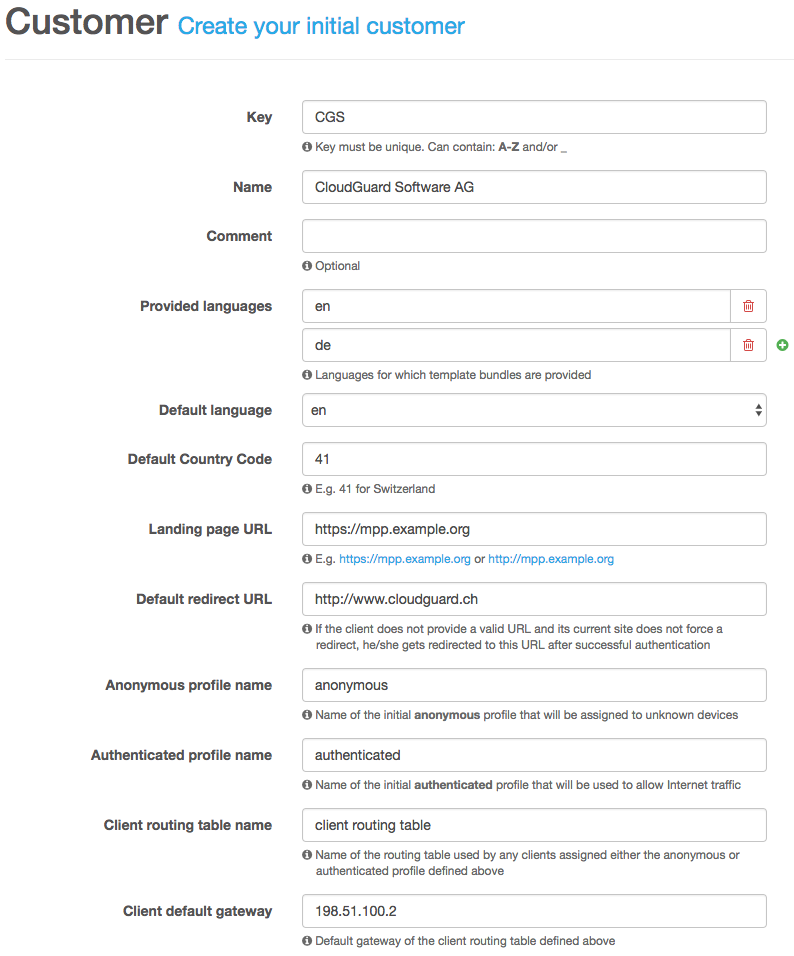
Finally, after you have configured your customer, the MPP web console login screen shows up. Login with the default credentials mpp-admin/mpp-admin.
4.2.4. Navigation
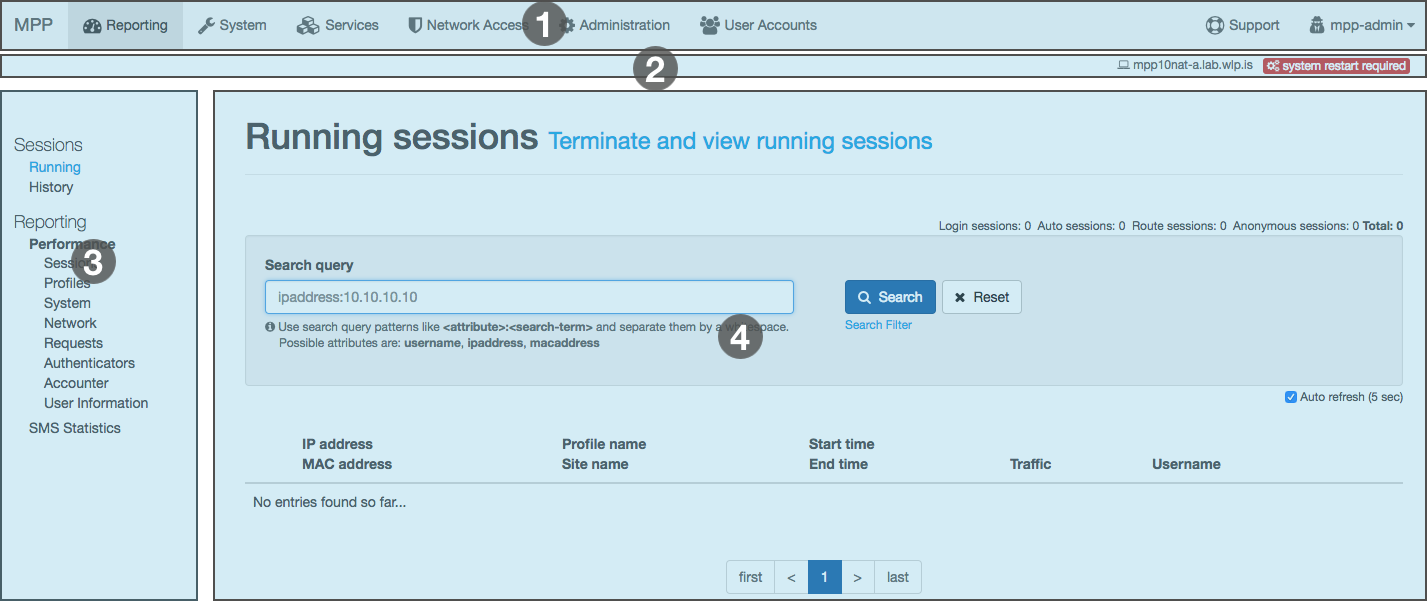
The MPP console is divided into four different sections:
- Main Navigation (1)
-
The main navigation is always visible and sticks to the top of the page. In the top right corner, the currently logged-in username is displayed. If you click on its name, you can either change the password or log out and leave the administration console.
- Meta Bar (2)
-
Relevant information, such as the hostname, the current configuration state, the sync state, the VRRP state, etc. is placed inside the meta bar and thus always available.
- Side Navigation (3)
-
If necessary, a second navigation will be shown on the left-hand side. With this navigation, you can navigate within the currently active section of the main navigation.
- Content (4)
-
This is the main part of the page and here you will see the content.
Usually, the configuration is done from left to right (main navigation) and from top to bottom (side navigation).
4.2.5. Connectivity
One of the essential parts of a networking device like the MPP is connectivity. Therefore, we need to configure our local IP addresses and routes. The MPP supports physical, VLAN (IEEE 802.1Q) and GRE interfaces.
Interfaces
Navigation: System | Network | Interfaces
Configure the physical interfaces according to the network topology as shown above. Once you have done this, continue with the VLAN interfaces.
| The loopback address 185.12.129.33 is a reserved address that belongs to our AS and is not routed. You can use it without a doubt. |
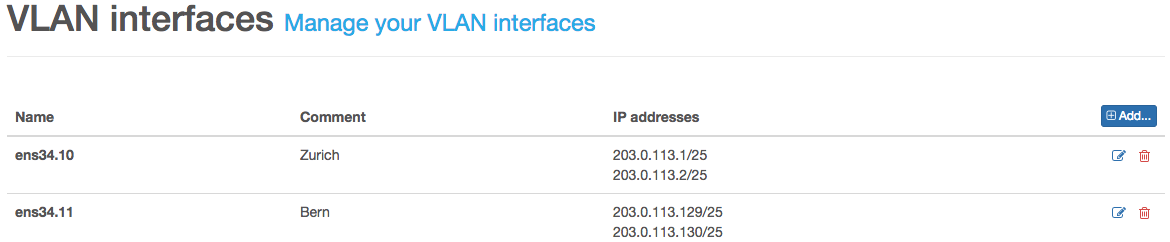
| If you plan to run your system in cluster mode, it may be helpful to enable the VRRP service first rather than to enable it afterward and reconfigure the virtual IP addresses once the initial configuration is done. |
Routing
Navigation: System | Network | Routing
The MPP maintains at least two different routing tables. The routes entered under System are mainly used by the system itself. It’s not necessary to configure layer two attached networks.
Change the default route gateway to use the uplink router.

4.2.6. System Firewall
Navigation: System | Network | System Firewall
| As long as no firewall input rule is configured, the MPP management (TCP/22 SSH and TCP/1443 Web Console) is accessible from anywhere. So we highly recommend that you configure your management source IP addresses. |
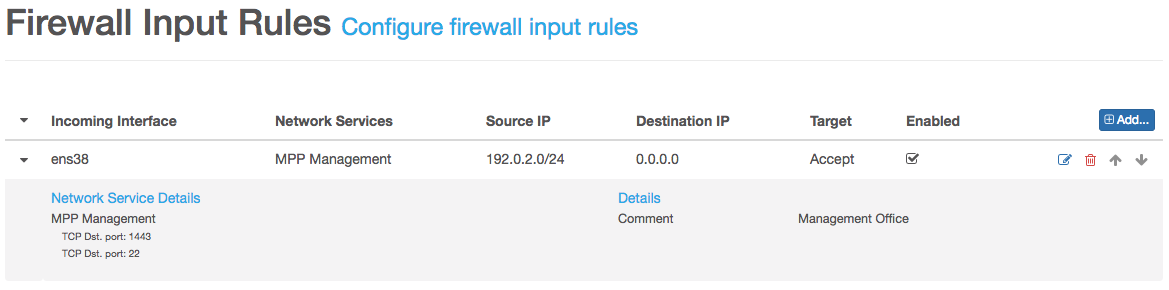
With this configuration the MPP is only accessible from IPs within the network 192.0.2.0/24 received on the management interface ens38.
In our setup we need to NAT/PAT any client traffic. The easiest way to achieve this is to configure a Post-Routing Firewall Rule as shown below.
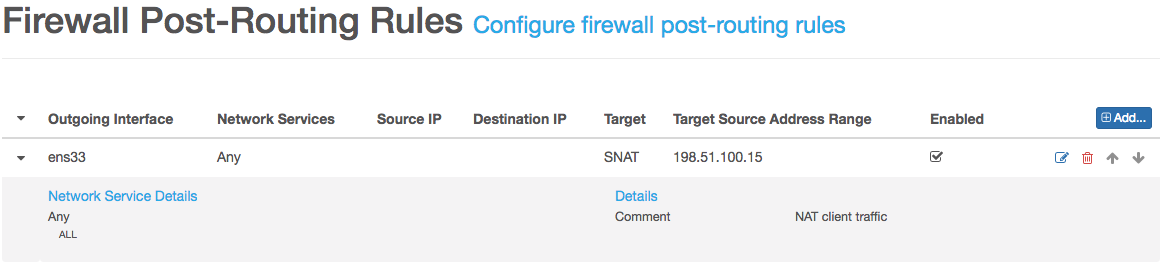
| After we’ve configured the basic connectivity parameters, it’s a good idea to save the changes we’ve made so far. |
4.2.7. Services
Navigation: Services
Any stuff related to Linux Daemons managed by the MPP is configured in this section. First of all, we need a DHCP service that assigns IP addresses to our clients. This can be done by using the existing DHCP server of the company with or without DHCP relay enabled. The easiest way is to run the DHCP server right on the MPP as we will do during this setup.
DHCP
Navigation: Services | Configuration | DHCP
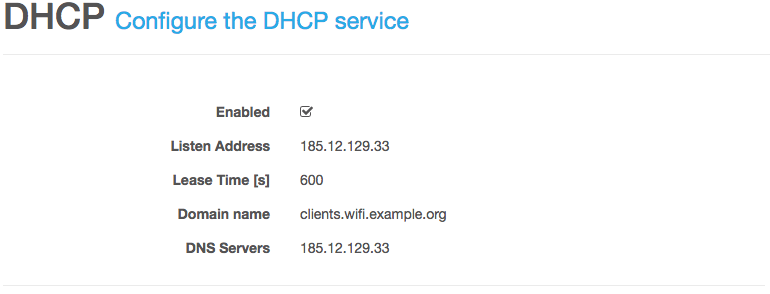
| Generally it’s a good idea to use a relatively small lease time such as 600 seconds. Keep in mind that any client that connects to your open wifi infrastructure requests an IP address. If you choose a common lease time of at least 24 hours you might run out of IP addresses pretty fast. |
DNS
Navigation: Services | Configuration | DNS
The DNS configuration is split into two views Services and Zones. First we need to configure the server service settings.
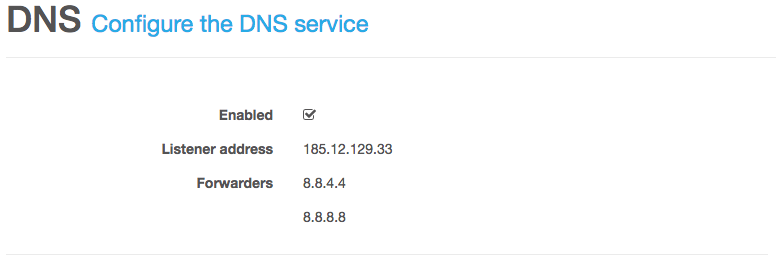
| As with the DHCP service it’s possible to use your external DNS server if you want. |
To create a new DNS zone we need to configure some meta data followed by the actual zone definition.
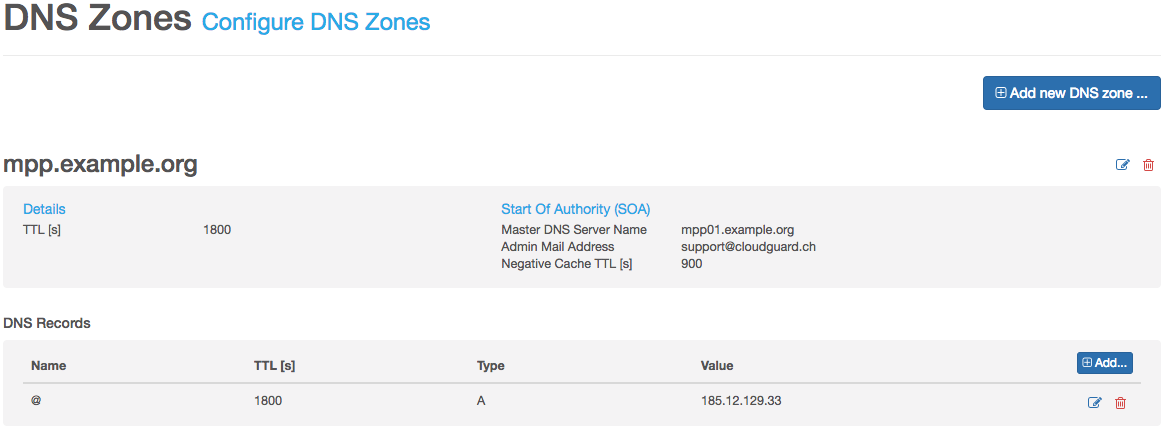
If you want that the name of your DNS record refers to the zone itself, use the @ sign as in this example.
| If you’re not a DNS expert it would be wise to use the default values recommended by the system. Therefore, read the provided help text carefully. If you want to use the default value just leave the field empty. |
NTP
Navigation: Services | Configuration | NTP
It’s always a good idea to run the MPP with time synchronization enabled. Otherwise reading log files can become really cumbersome.
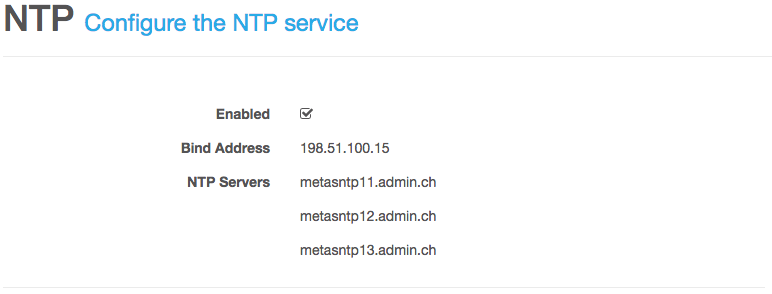
| Choose the Bind Address carefully. This address needs to be able to query the configured NTP servers. |
Save & Activate the configuration we did so far.
4.2.8. Network Services
So far we’ve configured our network connectivity parameters and the Linux Daemons we use. In this section we go a step further an configure the business logic of our installation.
Page Assets
Navigation: Network Access | Page Assets
With MPP 5.0 we’ve introduced a new concept to handling template assets like CSS, images, etc. and the templates themselves. You can download the current assets by clicking the Download button and upload the new assets by select the ZIP archive and press Upload.
| During the upload process, any existing data will be removed or overridden. Therefore the ZIP archive must include any assets needed by your setup. |
For our example we use the sample assets. Download and upload the sample assets.
More information about the template engine can be found here.
Template Bundles
Navigation: Network Access | Template Bundles
Working directly with templates is cumbersome and error-prone. Therefore, we offer template bundles to bundle different templates into a single logical unit. Any template bundle you want to navigate to needs a Key as identifier. In our example, the template bundles sms-registration, login and welcome need such a key. Otherwise, it would not be possible to navigate from the welcome page to the login or SMS registration page and vice versa.
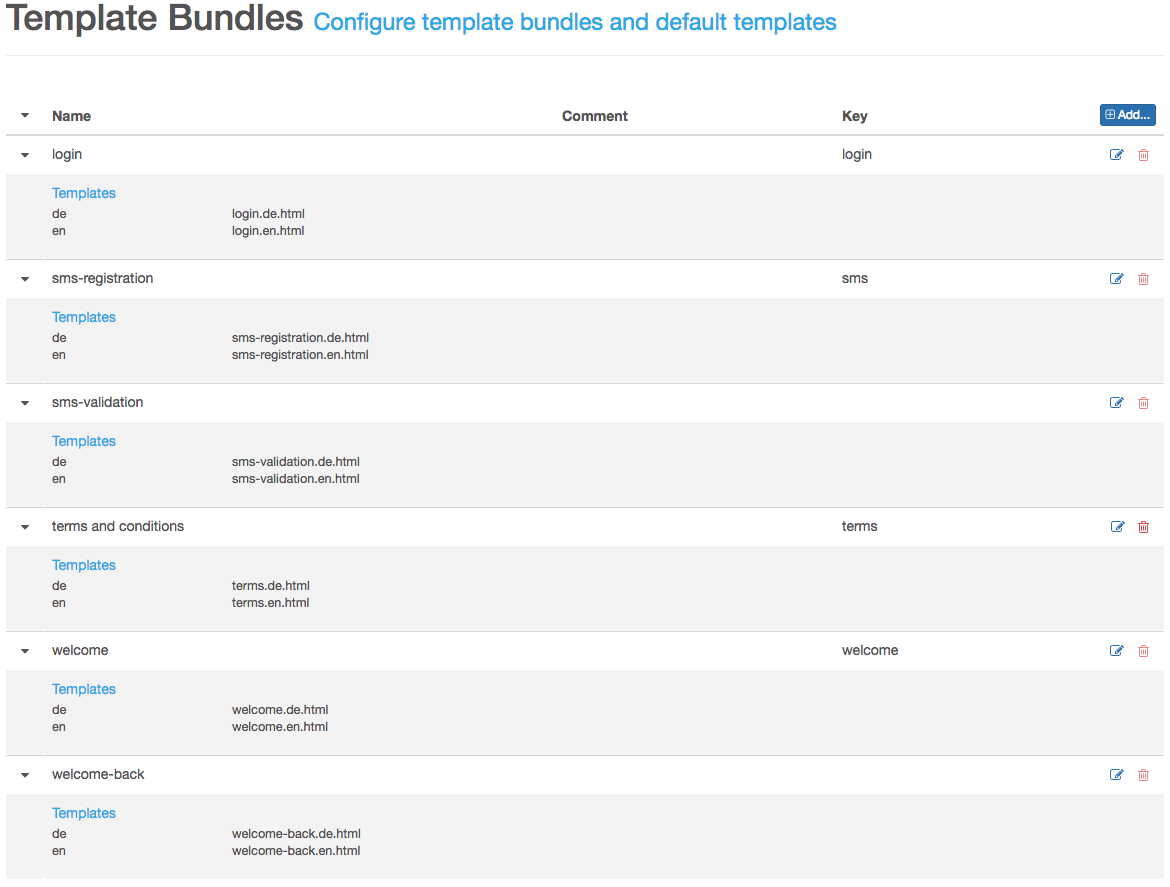
Routing Tables
Navigation: Network Access | Routing Tables
The MPP requires at least one client routing table per customer. Any traffic received from a docking network first queries this table. If no configured route matches, the system’s routing table is used. Incoming traffic does not use this routing table. Therefore, it is not necessary to configure directly attached or routed docking networks in this table.
| For safety reasons you should configure at least the default route 0.0.0.0/0. Otherwise, it would still be possible to query the system’s routing table. |
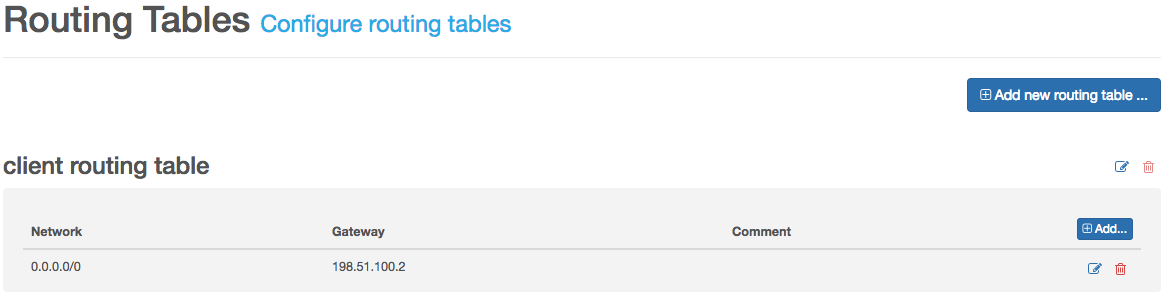
SMS Gateways
Navigation: Network Access | SMS Gateways
To send SMS the MPP offers three different gateway types:
-
CloudGuard SMS
-
Mail to SMS
-
HTTP-GET
In this tutorial we go with the CloudGaurd SMS gateway as this is our preferred one. If you need an Application Token do not hesitate and contact your account manager.
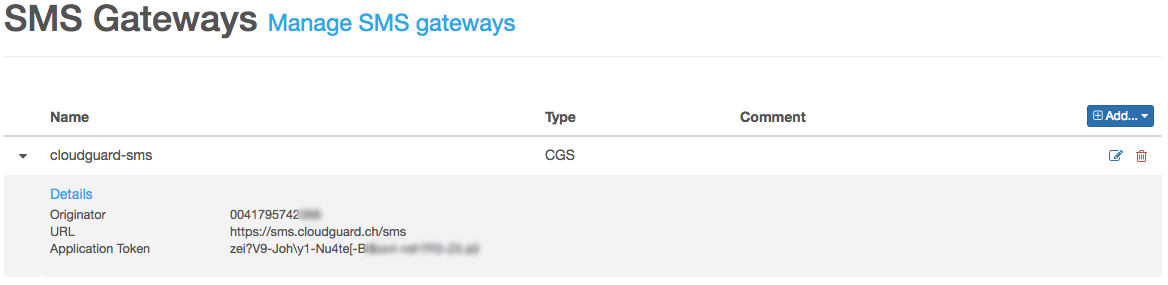
| We recommend that you use a valid phone number as originator, as many international operators do not allow alphanumeric phone numbers. |
Since MPP 5.0, we support multiple SMS gateway configurations per customer. Therefore, it is possible that you use different application tokens for different authentication scenarios and thus receive different invoices.
Open Garden Schemes
Navigation: Network Access | Open Garden Schemes
If you want to allow to access one or multiple dedicated IPs, networks or FQDNs without authentication, you are in the right place. The open garden scheme Certificates is built-in and managed by the MPP itself. When you upload a new certificate and select the Certificate Open Garden checkbox, the MPP inserts each defined CRL (Certificate Revocation List) and OCSP (Online Certificate Status Protocol) resource here.
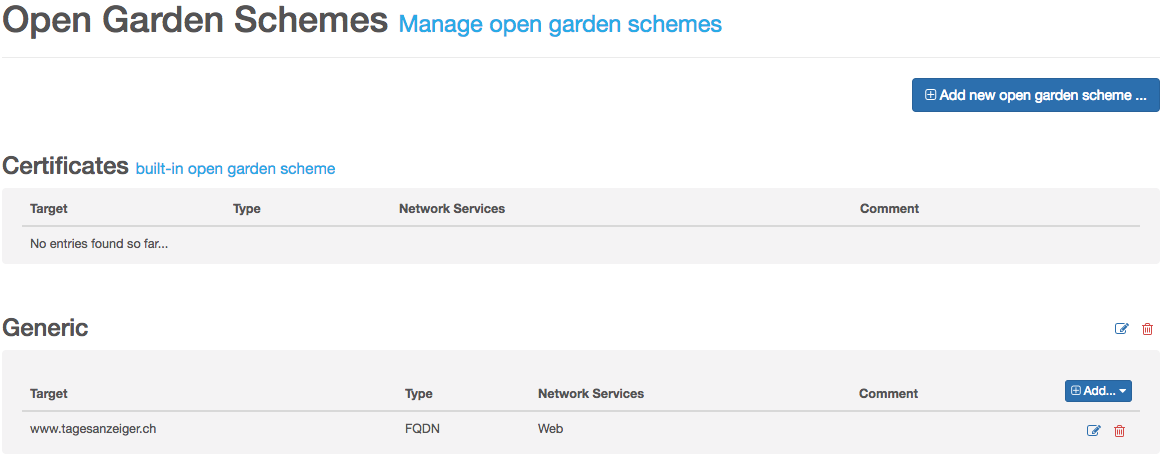
| To use FQDN based open gardens, the local DNS service must be configured and running. The MPP queries the local DNS every minute and updates the firewall rules as needed. If the DNS response provides multiple IP addresses, the MPP tracks each one of them. |
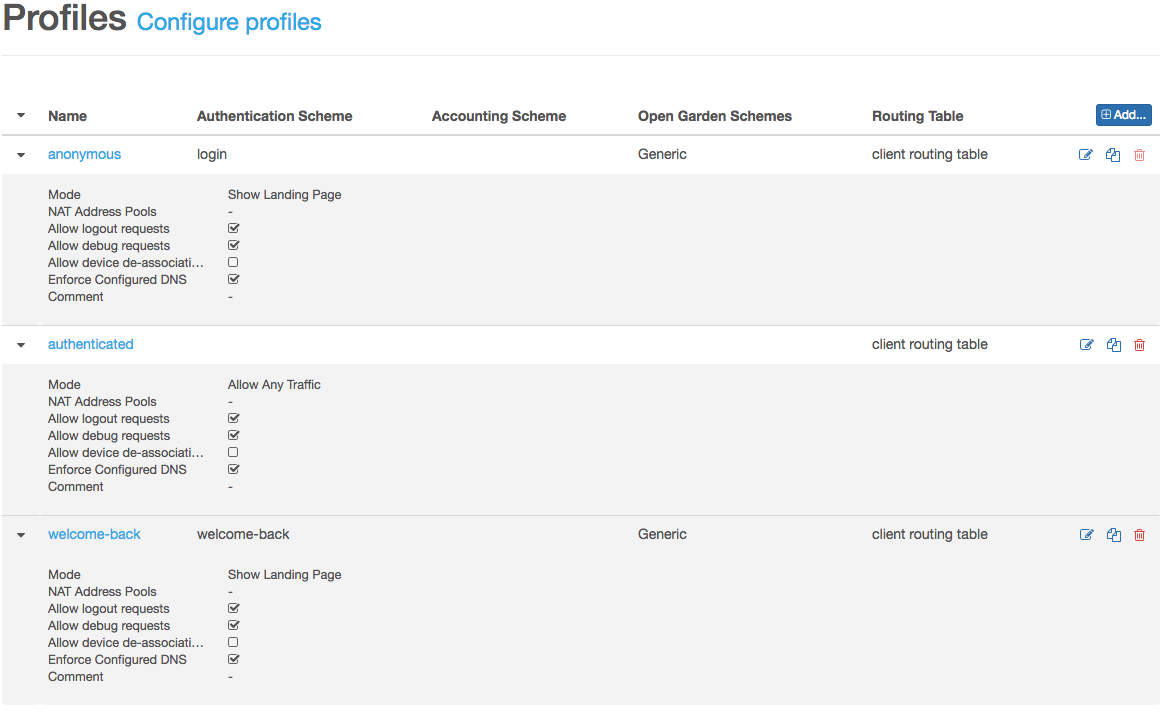
Profiles
Navigation: Network Access | Profiles
At any time, each client session has a profile assigned. A profile defines what authentication mechanisms, which open garden schemes and which client routing table is used for such a profile. In addition, any profile can provide its firewall pre-routing, forward and post-routing rules. A profile can run in three different modes: Allow Any Traffic, Show Landing Page and Use Manual Configuration.
- Allow Any Traffic
-
If a profile run in this mode, all traffic is allowed an nothing is filtered.
- Show Landing Page
-
If you select this mode, the MPP redirects each HTTP and HTTPS request to the configured landing page URL.
- Use Manual Configuration
-
Use this mode with caution, as you need to configure the redirect behavior by yourself.
In most cases, you will need at least two profiles: one for the anonymous devices and one for the authenticated devices.
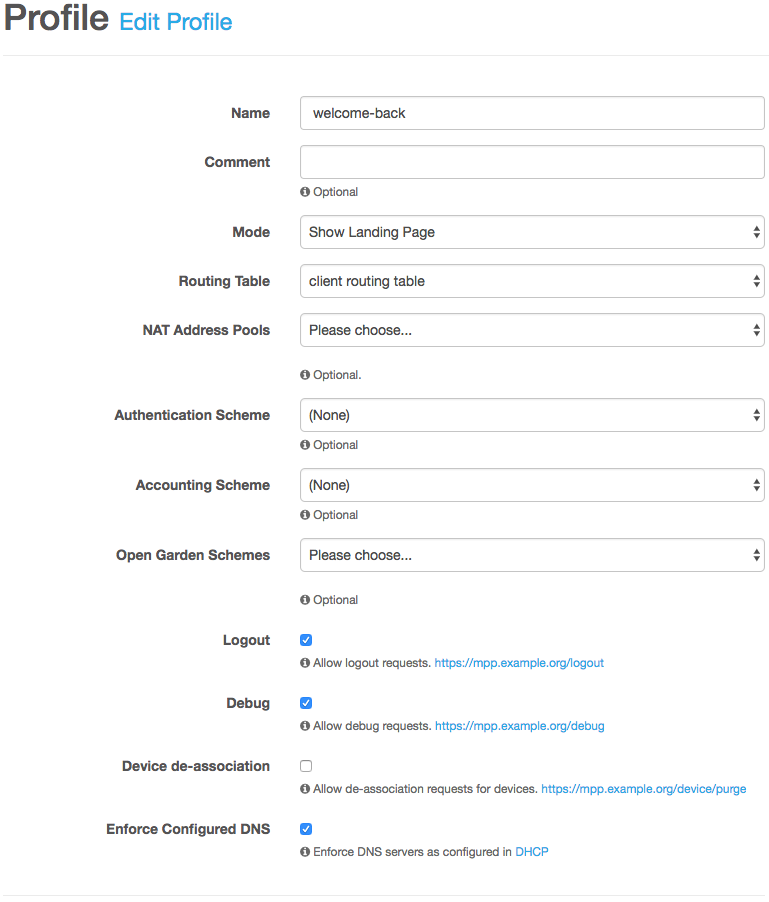
For our tutorial we need an additional profile to display a welcome back page. Create a new profile named welcome-back. Also, enable the Logout, Debug and Enforce Configured DNS feature for each profile.
- Logout
-
When enabled, the user can end their session by calling the URL
https://mpp.example.org/logout. - Debug
-
If this option is enabled, the user can view their session information by requesting the URL
https://mpp.example.org/debug. - Enforce Configured DNS
-
With this function in place, every DNS request is forwarded to the locally running DNS server.
Sites
Navigation: Network Access | Sites
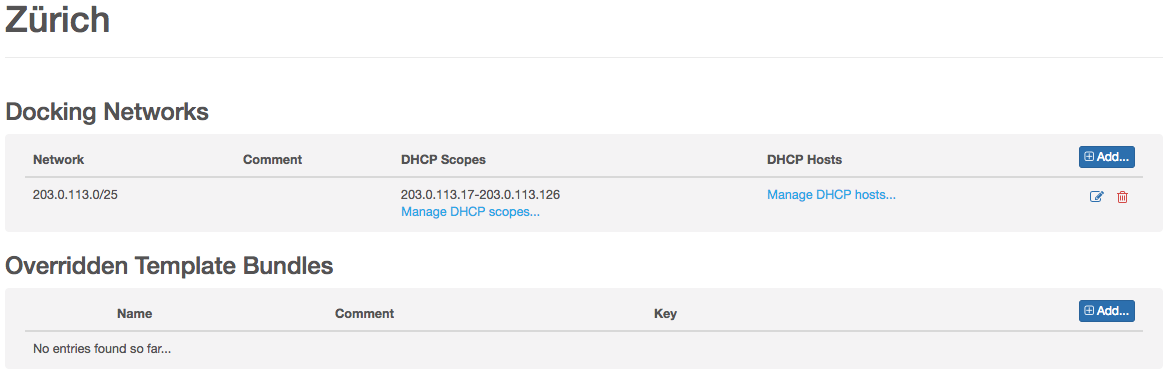
Configure the two sites Bern and Zurich and their DHCP scopes. You can leave the optional fields blank.
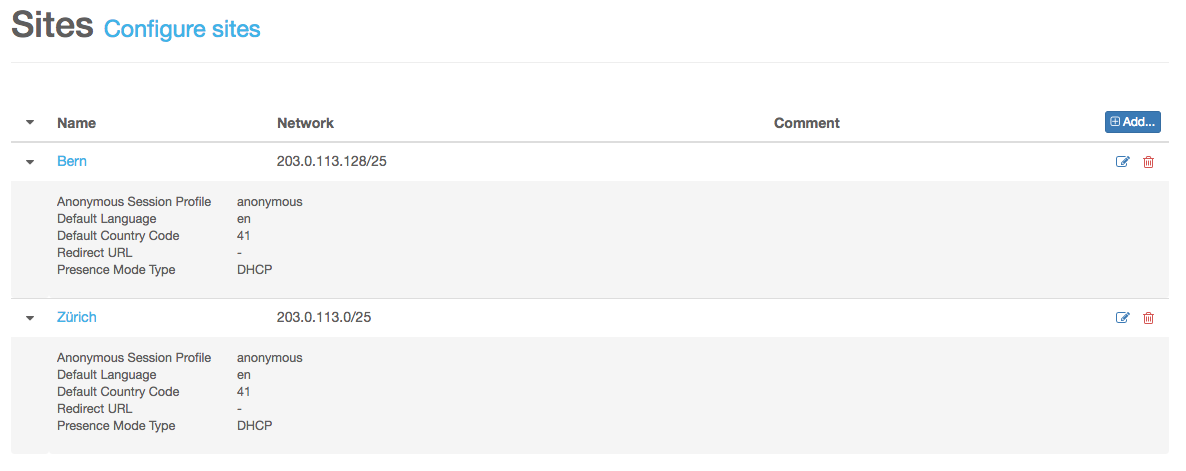
User Groups
Navigation: User Accounts | User Groups
Before we can start configuring our authentication schemes, we need to create the user groups. Create a user group called Self-registered Users with the key SRU and one with the name Employees and the key EMPL.

Authentication Schemes
Navigation: Network Access | Authentication Schemes
First, create an authentication scheme named login and one named welcome-back.
We start with the simple one. Configure the authentication scheme welcome-back as follows:
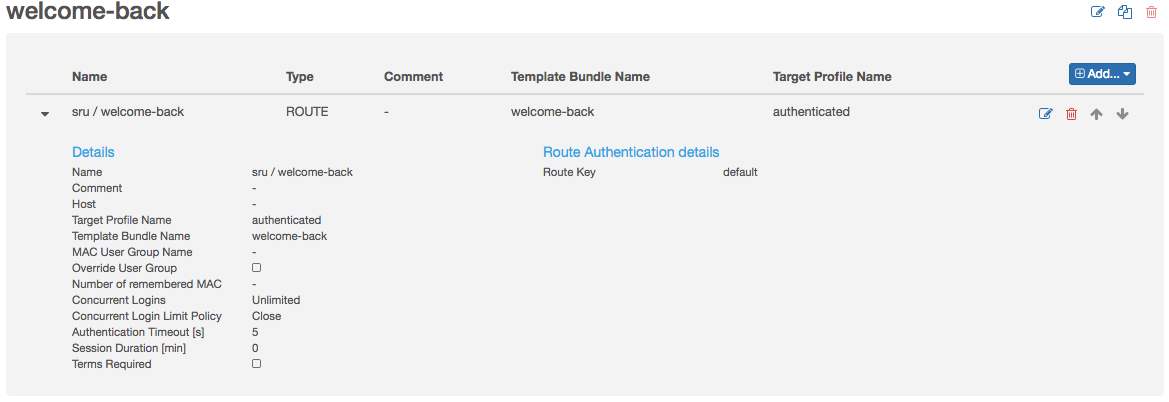
In this authentication scheme, we use only a Route Authenticator.
The scheme login is a little more complicated as shown in the following overview:
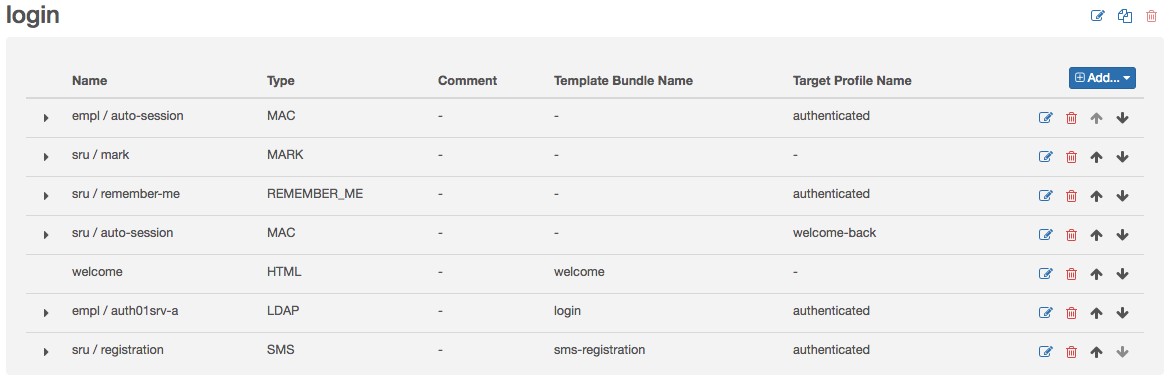
-
Configure a MAC Authenticator to start an auto-session for our employees
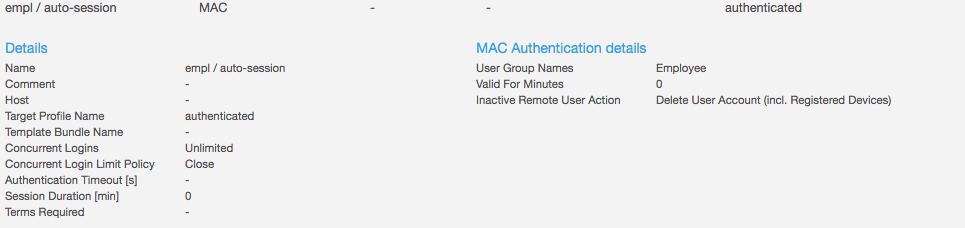 Figure 26. MAC Authenticator empl / auto-session
Make sure, that you set the option Inactive Remote User Action to Delete User Account (incl. Registered Devices) to ensure, that the user account is removed, when the user is removed on the LDAP server. -
In order to remember the authentication token of our self-registered users, you will have to configure two authenticators.
Configure a Mark Authenticator, to mark self-registered users that need to be remembered
 Figure 27. Mark Authenticator sru / mark
Configure a Remember Me Authenticator to check if a self-registered user should be remembered, based on the marks that were set
 Figure 28. Remember Me Authenticator sru / remember-me
With this configuration, each remembered authentication token is removed at midnight.
-
Configure a MAC Authenticator to start a welcome-back session for our self-registered users
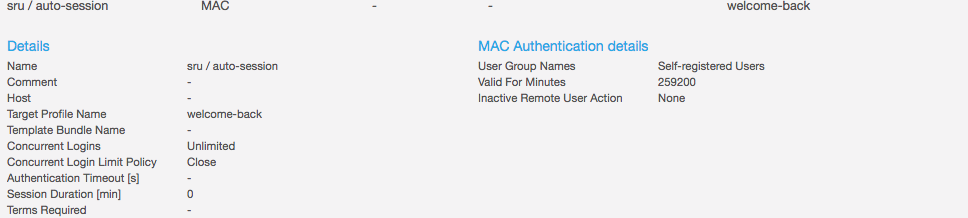 Figure 29. MAC Authenticator sru / auto-session
If the MAC address is known by the MPP, a welcome-back session is started and assigned to device.
In contrast to the empl / auto-session configuration, it is not necessary to set the option Delete User Account (incl. Registered Devices) as the MPP can not know whether the account is still valid or not. Therefore, this option would have no effect. -
Configure a HTML Template to display the welcome page
 Figure 30. HTML Template welcome
On this page the user can choose between LDAP login or SMS registration.
-
Configure a MAC Authenticator to allow employees to login
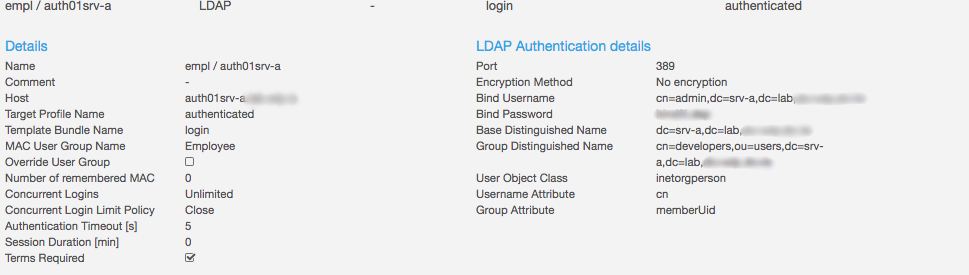 Figure 31. LDAP Authenticator empl / auth01srv-a
 -
Configure an SMS Authenticator to allow users to register
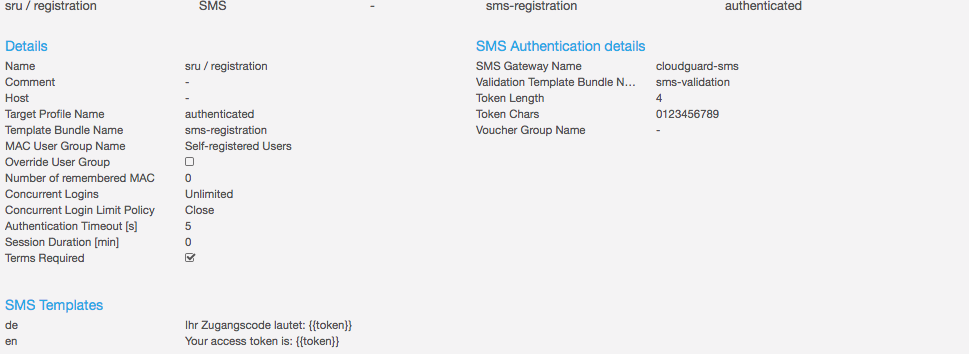 Figure 32. SMS Authenticator sru / registration
Update Profile
Navigation: Network Access | Profiles
Go back to the profiles page and edit the profile anonymous. Assign the authentication scheme login and the open garden scheme generic.
4.2.9. Finish setup
If you are running the MPP in a VMware virtual environment, we recommend that you install the open VM tools.
Before we can start testing our configuration, we need to Save & Activate the current configuration. Save the configuration and then restart the MPP by navigating to Administration | System Admin and clicking Reboot.
| Do not reload the browser window manually because the MPP Console automatically checks if the MPP is available. |
4.2.10. Setup backup system
In this step, we are going to transform our installation into a redundant setup. First we install the backup system and configure its network connection:
-
Install Backup System from ISO Image
-
Accept the end-user license agreement
-
Do not run the MPP in the cluster coordinator mode
-
Configure an initial customer
It does not matter what you enter here as we will load the configuration from mpp01 later. -
Configure IP addresses
Configure the IP addresses as shown in the network topology diagram above. However, do not configure the VRRP addresses.
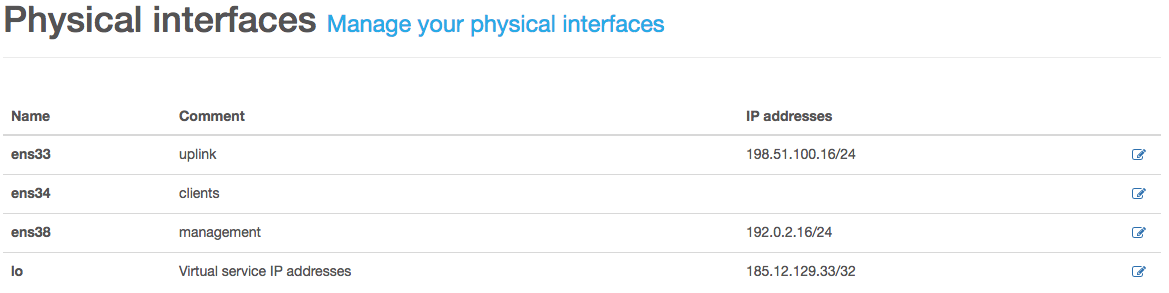 Figure 34. Physical Network Interfaces on mpp02.example.org
 Figure 35. VLAN Network Interfaces on mpp02.example.org
 -
Configure Peer
Navigate to Services | Configuration | Sync | Peer & Federation and configure mpp01 as your peer. We will synchronize via the management network. The field Peer System ID refers to the system ID of mpp01. Copy the ID of mpp01 at System | General | Settings.
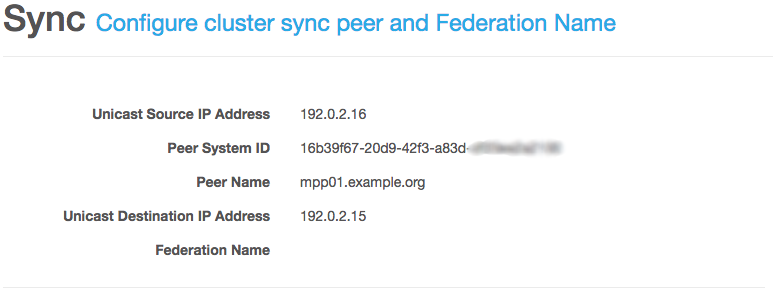 Figure 36. Peer & Federation Configuration on mpp02.example.org
 -
Save and activate the new configuration
Now it’s time to go back to mpp01.example.org.
-
Configure Peer
Configure mpp02 as the mpp01 peer as we did before with mpp02.
-
Configure VRRP
Navigate to Services | Configuration | VRRP | Service and configure the VRRP daemon.
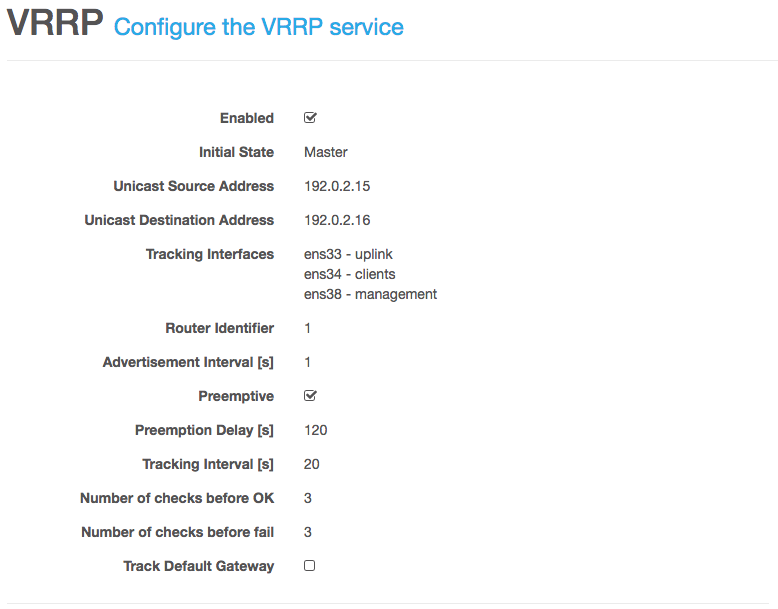 Figure 37. VRRP Configuration
 -
Re-Configure IP addresses
Head over to System | Network | Interfaces | VLAN and reconfigure the interfaces as follows:
 Figure 38. VLAN Configuration on mpp01 with VRRP enabled
 -
Save and activate the new configuration
-
Restart mpp01
Go back to mpp02.example.org and finish its configuration.
-
Load synchronized configuration
Navigate to Administration | Manage Config and click Load on the latest synchronized configuration. Verify that the configuration of the VLAN interfaces has been successfully updated.
-
Enable and configure each service
Navigate through each service and carefully update the fields annotated with the broken chain
 symbol. In general, you only need to enable the service itself and configure its
listening IP address. The remaining settings should be ok. There is an exception. At the VRRP daemon you have to add the
tracking interfaces manually.
symbol. In general, you only need to enable the service itself and configure its
listening IP address. The remaining settings should be ok. There is an exception. At the VRRP daemon you have to add the
tracking interfaces manually. -
Save and activate the new configuration
-
Restart mpp02
-
Trigger seed
Go to Services | Overview | Sync Neighbors an click Trigger seed next to the hostname mpp01.example.org.
5. Client API
5.1. Paths
5.1.1. Get device information
GET /device/information
Description
Sample cURL GET request:
curl -v "https://mpp01.example.org/device/information?customer-key=MPP&mac=320013edc120"
Parameters
| Type | Name | Description | Schema |
|---|---|---|---|
Query |
customer-key |
Key of the customer |
string |
Query |
mac |
Client MAC address with or without any delimiter |
string |
Query |
site-id |
Site id to limit the request to a single site. If not provided, the result will include information from all sites. |
string |
Responses
| HTTP Code | Description | Schema |
|---|---|---|
200 |
Successful operation |
|
400 |
Parameters missing or invalid |
No Content |
403 |
Forbidden operation, not allowed to read device information |
No Content |
404 |
Customer not found |
No Content |
429 |
Too many requests, try again later |
No Content |
500 |
Internal server error |
No Content |
Produces
-
application/json
Example HTTP response
Response 200
{
  "groupKey" : "SRU",
  "marks" : [ {
    "mark" : "First class",
    "createdAt" : "2011-12-03T10:15:30Z",
    "siteId" : "eaed12a4-c34f-4473-a9af-74fca9b9642f",
    "siteName" : "Zurich"
  } ]
}
5.1.2. Start MPP session
POST /session
Description
Sample cURL POST request:
curl -v -H "Content-Type:application/json" \
-d '{"mac":"112233445566","ip":"203.0.113.123"}' https://mpp01.example.org/session
Parameters
| Type | Name | Description | Schema |
|---|---|---|---|
Body |
body |
Session object (JSON) that needs to be started |
Responses
| HTTP Code | Description | Schema |
|---|---|---|
201 |
Successful operation |
No Content |
400 |
Invalid session data supplied |
No Content |
403 |
Forbidden operation, not allowed to start session |
No Content |
404 |
Site for IP address not found |
No Content |
409 |
Session already exists |
No Content |
429 |
Too many requests, try again later |
No Content |
500 |
Internal server error |
No Content |
Consumes
-
application/json
Example HTTP request
Request body
{
  "mac" : "11-22-33-44-55-66",
  "ip" : "203.0.113.123",
  "hostname" : "My iPhone"
}
5.1.3. Stop MPP session
DELETE /session/{ip}
Description
Sample cURL DELETE request:
curl -v -X DELETE https://mpp01.example.org/session/203.0.113.123
Parameters
| Type | Name | Description | Schema |
|---|---|---|---|
Path |
ip |
Client IP address. e.g. 203.0.113.123 |
string |
Responses
| HTTP Code | Description | Schema |
|---|---|---|
204 |
Successful operation |
No Content |
400 |
Invalid IP address supplied |
No Content |
403 |
Forbidden operation, not allowed to stop session |
No Content |
404 |
Session not found |
No Content |
429 |
Too many requests, try again later |
No Content |
500 |
Internal server error |
No Content |
5.2. Definitions
5.2.1. Device Information
| Name | Description | Schema |
|---|---|---|
groupKey |
Key of the group the user associated with the MAC address belongs to |
string |
marks |
Mark information |
< Mark Information > array |
5.2.2. Mark Information
| Name | Description | Schema |
|---|---|---|
createdAt |
The mark creation timestamp in ISO-8601 date-time format (UTC) |
string (date-time) |
mark |
Example : |
string |
siteId |
Id of the site |
string |
siteName |
Name of the site |
string |
5.2.3. Session
| Name | Description | Schema |
|---|---|---|
hostname |
Client hostname |
string |
ip |
Dotted-decimal formatted client IP address |
string |
mac |
Client MAC address without or with any delimiter |
string |
6. What’s New Archive
6.1. MPP 6.7
- API Access
-
API access is now configurable for each customer in "Network Access" section. Refer to Section 2.2.3, “API Access” for more information.
- Device Information
-
We added a new API to gather device information.
- Mark Authenticator
-
We added a Mark authenticator that allows you to set and reset marks for a RememberMe authenticator. A RememberMe authenticator will no longer work, without having a Mark authenticator configured.
6.2. MPP 6.6
- Client API
-
We added a new API to manually start and stop user sessions.
- Presence Mode
-
Each site has now a presence mode (DHCP or Traffic) that differentiates whether sessions are managed automatically via DHCP lease or manually via client API. Refer to Section 2.2.2.1, “Presence Mode” for more information.
6.3. MPP 6.5
- RADIUS class attribute
-
If present the RADIUS authenticator will read and evaluate the RADIUS attribute class (Type 25). Besides, the assigned profile name is signaled via the class attribute during RADIUS accounting.
6.4. MPP 6.4
- Network configuration
-
The systems' network configuration will be written every time you modify the MPP’s network configuration. Thus the server should be reachable even if the MPP is unable to start.
- Restrict supported SSL ciphers
-
With this release, we have dropped some legacy SSL ciphers to protect the MPP against newer SSL attacks.
- Synchronization
-
We did a lot of work to make the MPP synchronization even more reliable.
- User session history
-
We have re-written large parts of the user session history to handle huge repositories with over 30 million entries.
6.5. MPP 6.3
- Dashboard
-
Under Reporting | Dashboard you get a quick overview of the current state of your MPP setup.
- Maintenance Mode
-
It’s now possible to put the MPP into maintenance mode Administration | System Admin. If the system runs in this mode, it won’t handle any DHCP or HTTP client requests. If the MPP runs in a cluster setup, this mode prevents the system from becoming VRRP master. To exit the maintenance mode, you must explicitly deactivate it.
- Show current session count via CLI
-
Call
mpp-sessions.pyon the MPP CLI, and it will show you the currently active user count. - Copy profile or authentication scheme
-
Till now it was cumbersome to create a similar authentication scheme. With this release, we introduce a copy functionality for profiles and authentication schemes.
- Enforce configured DNS server
-
If you create or edit a profile, you get a new option called Enforce Configured DNS. If you enable this option the MPP will automatically redirect any TCP and UDP traffic on port 53 to the first DNS configured in your DHCP settings. This feature is only available if the local DHCP server is configured and enabled.
6.6. MPP 6.2
| With this version, we introduce a new backup format. Therefore it’s mandatory to create a new backup after a successful upgrade. In addition, you can schedule backup jobs, so you only have to download them but do not need to wait until the backup is ready. |
For systems with higher security requirements we support CSRF prevention for any landing page action like login, route, logout, debug and device de-association.
6.7. MPP 6.1
- Remember-me authenticator
-
With this release, we introduce the remember-me authenticator. This authenticator can remember an authentication done by another authenticator. So it’s possible to configure authentication chains where a user needs to authenticate only once a day for example.
6.8. MPP 6.0
SMS Gateway: We’ve switched to our new redundant SMS gateway. To use the new gateway, you have to order credentials for the new one and re-configure any existing SMS configuration.
Open garden scheme: Define open gardens in a scheme and reference that scheme from any profile you want.
Initial seed: Get the initial data like user session history, user account et cetera from you neighbor MPP.
- MPP Cluster Coordinator
-
If you ever wanted to span the same MPP user database over several MPP Clusters our new MPP Cluster Coordinator will be your friend.
- Certificates
-
Support for certificates without a common name
6.9. MPP 5.6
- SMS Statistics
-
We’ve added a new view that shows how many SMS have been sent by which gateway to which country.
- Failed Retries Authenticator
-
The Failed Retries Authenticator now counts sent SMS and block if the limit gets reached.
- Expand/Collapse Firewall Rules
-
Add ability to expand/collapse all firewall rules with one click.
- Authentication Endpoints per FQDN
-
It is now possible to configure authentication endpoints like LDAP servers by its FQDN instead of its IP address.
- DHCP hosts
-
It’s now possible to configure static IP assignments per site.
- SMS statistics
-
We introduced detailed SMS statistics per SMS gateway. You’ll find the report at Reporting | SMS Statistics.
6.10. MPP 5.5
Since version 5.5.0 the MPP runs on the Ubuntu LTS 16.04 release with Linux Kernel 4.4.
- QoS
-
With this release, it’s possible to rate a client by Customer, Profile or MAC address.
- Kernel Subsystem
-
With this release we retired the Sioux Daemon and replaced its functionality with three new Daemons: Lawful Interception, Snoopy and Netmaid
- Metered Device Authenticator
-
In addition to the existing metering mode Time we’ve added the new mode Traffic. This mode allows you to terminate a session if the client hits either the download limit or the upload limit.
- KeepaliveD
-
Upgrade to version 1.3.4
7. Changelog
7.1. MPP 6.8.2
Release: September 26, 2018
Bug
-
[MPP-1800] - Make IPset table size configurable
7.2. MPP 6.8.1
Release: September 1, 2018
Bug
-
[MPP-1778] - Do not track listening VRRP interface
7.3. MPP 6.8.0
Release: August 31, 2018
Task
-
[MPP-1757] - Show not running service names in dashboard tooltip
-
[MPP-1766] - Upgrade to Keepalived 2.0.7
-
[MPP-1770] - Upgrade to Kafka 2.0.0
Bug
-
[MPP-1733] - No error for invalid nginx config
-
[MPP-1734] - Delete old certificates
-
[MPP-1736] - Kafka topic with wrong broker ID if CC is rebooted before broker ID is configured
-
[MPP-1753] - Chat topic should never block
-
[MPP-1756] - Service API /device/information might fail
-
[MPP-1758] - Prohibit empty GIT commits
-
[MPP-1762] - Save & Activate might fail with 'Reset network failed'
-
[MPP-1763] - Binding result is mapped to a wrong variable
-
[MPP-1764] - Broken MPP 5 to 6 upgrade
-
[MPP-1771] - LDAP/AD authenticator does not validate the peer correctly
Story
-
[MPP-1772] - Prevent SMS flooding
-
[MPP-1777] - Index NAT IP addresses
7.4. MPP 6.7.1
Release: June 1, 2018
Bug
-
[MPP-1750] - GUI error in the extended API access view
-
[MPP-1755] - Ldap Authentication fails with [LDAP: error code 3 - Timelimit Exceeded]
7.5. MPP 6.7.0
Released: May 18, 2018
Task
-
[MPP-1738] - Upgrade to Kafka 1.1.0
-
[MPP-1739] - Upgrade to Spring Boot 2.0.2
-
[MPP-1741] - Upgrade to Keepalived 1.4.3
-
[MPP-1742] - Indicate unsaved config changes in MPP console
-
[MPP-1746] - Upgrade to ZooKeeper 3.4.12
Bug
-
[MPP-1740] - Resolved IPv6 addresses are logged as a warning
-
[MPP-1747] - The usage of DHCP hosts produces Syslog warnings, saying that there are overlapping networks
-
[MPP-1748] - Asset path module doesn’t get rendered, if there are no assets
Story
-
[MPP-1743] - Provide an API to request device information
-
[MPP-1744] - Ability to show a landing-page to unknown devices
-
[MPP-1745] - Authenticator to reset a specific remember-me mark
7.6. MPP 6.6.0
Released: April 6, 2018
Task
-
[MPP-1612] - Update documentation
Bug
-
[MPP-1725] - Delete user accounts after data retention time if they were created automatically
-
[MPP-1730] - Registered user device cleanup task
-
[MPP-1731] - User device cleanup task
-
[MPP-1732] - DHCP scope definition may contain network or broadcast address
-
[MPP-1737] - Allow ICMP and VRRP between sync peers
Story
-
[MPP-1690] - REST interface to start and stop sessions
-
[MPP-1727] - Drop network services
-
[MPP-1728] - Add comment field for DHCP host entries
7.7. MPP 6.5.2
Released: March 15, 2018
Task
-
[MPP-1722] - Upgrade to Kafka 1.0.1
Bug
-
[MPP-1696] - Close DB connection if the running thread gets interrupted
-
[MPP-1706] - Prevent same landing page and redirect URL
-
[MPP-1707] - Landing page URL must be unique
-
[MPP-1712] - Load and activate of manually created config version fails
-
[MPP-1713] - Cluster coordinator startup failed
-
[MPP-1716] - M2M log dispatcher fails
-
[MPP-1717] - Last seen of user account set to null on edit
-
[MPP-1718] - Last seen of running is incorrectly updated
-
[MPP-1719] - User account that is valid forever must remain
-
[MPP-1720] - If an interface is deleted, the configured QoS rule stays
-
[MPP-1723] - Broken MPP views on IE11
Story
-
[MPP-1721] - Bundle MPP documentation with MPP Debian package
7.8. MPP 6.5.1
Released: March 6, 2018
Bug
-
[MPP-1714] - Broken SbbM2mImportAppCfg
7.9. MPP 6.5.0
Released: March 2, 2018
Task
-
[MPP-1698] - Set offset reset policy for chat topics
-
[MPP-1701] - Upgrade to keepalived 1.4.2
-
[MPP-1711] - Respect provided languages in actual language evaluation
Bug
-
[MPP-1695] - Revived RunningUserSessions should not be synced
-
[MPP-1697] - Broken SBB user import feature
-
[MPP-1700] - Inconsistent RADIUS attribute value encoding
-
[MPP-1704] - Revision not set in insert statements
-
[MPP-1705] - Wrong revision in synced entity
-
[MPP-1708] - Site bulk controller is not customer aware
-
[MPP-1709] - Remember me table is missing in seed
-
[MPP-1710] - Race condition in VLAN interface configuration
Story
-
[MPP-1680] - Make LDAP logging cleaner
-
[MPP-1683] - DHCP Relay Built-In Network Service
-
[MPP-1688] - Extend RADIUS authenticator to support group membership
-
[MPP-1689] - Provide information about assigned profile in RADIUS accounting
7.10. MPP 6.4.1
Released: February 22, 2018
Bug
-
[MPP-1229] - Visualization issues of failed "save" config attempts
-
[MPP-1672] - Save & Activate invalid config
-
[MPP-1684] - Prevent FQDN open gardens if local DNS server is not running
-
[MPP-1685] - Redirect to landing page url should not be possible if no template bundle is defined
-
[MPP-1687] - Stop database cleanup during seed
-
[MPP-1693] - No available DB connections during VACUUM of user_session table
-
[MPP-1694] - Double accounting on backup and sync back to master
Story
-
[MPP-1691] - Skip synced RunningUserSession if Device is missing in cluster mode
7.11. MPP 6.4.0
Released: February 14, 2018
Task
-
[MPP-1647] - Upgrade to Apache Velocity Engine 2.0
Bug
-
[MPP-1631] - Loading of a synchronized configuration with a newer version must not be possible
-
[MPP-1636] - During a config save/load, all buttons should be inactive
-
[MPP-1643] - Dashboard summary session count coloring is not federation aware
-
[MPP-1650] - Registered user device and user account repository doesn’t support customer key change
-
[MPP-1655] - TaskService may time out during shutdown
-
[MPP-1658] - Recover from publish failure
-
[MPP-1663] - VRRP isn’t started if peer is offline
-
[MPP-1665] - Sync state doesn’t switch to error when system is outdated
-
[MPP-1666] - Broken user session history pagination
-
[MPP-1668] - FW rule conversion throws several NPE
-
[MPP-1669] - Open garden update process is not configuration life-cycle aware
-
[MPP-1671] - FW pre-routing rule DNAT target destination port range only for tcp and udp
-
[MPP-1673] - Missing config validation in system agent controller
-
[MPP-1674] - ifup may fail on persisted vlan network interface
-
[MPP-1675] - Remember-Me is broken
-
[MPP-1678] - Make traffic counter collector task life-cycle aware
Sub-task
-
[MPP-1651] - Re-index after seed
-
[MPP-1652] - Re-index after restore
-
[MPP-1653] - Add ability to re-index via web console
Story
-
[MPP-1630] - Persist network interface configuration
-
[MPP-1633] - Show maintenance mode in dashboard
-
[MPP-1634] - Improve user session search
-
[MPP-1638] - Defer VRRP start till MPP sync state is OK
-
[MPP-1639] - Sort dashboard entries by master’s hostname
-
[MPP-1641] - Keep existing registered user devices during merge
-
[MPP-1642] - Try to recover a synchronized orphaned registered user device
-
[MPP-1644] - Generate mpp package via Maven
-
[MPP-1645] - Write accounting log file on backup system too
-
[MPP-1649] - Show meta bar on the dashboard
-
[MPP-1654] - Check VRRP source address of unicast packets
-
[MPP-1659] - Make postgres server configurable
-
[MPP-1660] - Report sync health state via health script
-
[MPP-1661] - Report Elasticsearch’s health state via health script
-
[MPP-1662] - Drop fk_user_session_psid and refactor forEach
-
[MPP-1664] - Vacuum user database tables after cleanup
-
[MPP-1667] - Reorder firewall fields
-
[MPP-1676] - Restrict supported SSL ciphers
7.12. MPP 6.3.2
Released: December 5, 2017
Bug
-
[MPP-1637] - Skip registered user device of locally unknown user account
7.13. MPP 6.3.1
Released: November 30, 2017
Bug
-
[MPP-1635] - Broken config upgrade due to duplicate config version 9
7.14. MPP 6.3.0
Released: November 30, 2017
Task
-
[MPP-1613] - Upgrade to Kafka 1.0
Bug
-
[MPP-1618] - Package python3-requests is missing
-
[MPP-1626] - Profile view broken
-
[MPP-1629] - It is not possible to register the same MAC address at two different customers
Story
-
[MPP-1099] - Dashboard
-
[MPP-1608] - Maintenance Mode
-
[MPP-1609] - Defer VRRP state transition to Master
-
[MPP-1611] - Optimize MPP site bulk import
-
[MPP-1619] - Run session-count.py without authentication
-
[MPP-1620] - Copy authentication scheme
-
[MPP-1621] - Prevent profile deletion if profile is used as target profile
-
[MPP-1624] - Copy profile
-
[MPP-1625] - Enforce configured DNS server
-
[MPP-1627] - Show action URLs in profile view
-
[MPP-1628] - Improve description of cron fields
7.15. MPP 6.2.0
Released: November 2, 2017
Task
-
[MPP-1601] - Ensure that the MPP package depends on Ubuntu 16.04
-
[MPP-1602] - Upgrade to keepalived 1.3.9
Bug
-
[MPP-1540] - Metric batch insert may fail
-
[MPP-1548] - Handle DHCP RELEASE message without IP address
-
[MPP-1560] - IPset does not support prefixes lower than 1 for network definitions
-
[MPP-1563] - Wrong offset in TopicMirror
-
[MPP-1565] - Inconsistent running user session repo
-
[MPP-1570] - MDA should only block if the target/current profile is one of his metered profiles
-
[MPP-1581] - compareTo in model objects
-
[MPP-1582] - Load old config version creates new commit
-
[MPP-1584] - Performance Graphs use edit config instead of running config
-
[MPP-1585] - Overlay error in DateTimeControl
-
[MPP-1586] - Anonymous profile in customer edit view is not selected if a different customer is selected in the customer switch
-
[MPP-1587] - Do not write db dump file into the persistent (config) directory during a backup task
-
[MPP-1591] - Fix React key-prop warnings when using Format.CollectionAsDelimitedElement()
-
[MPP-1596] - Not all MPP service daemons disabled on system start
-
[MPP-1600] - Warning state for Kafka and Zookeeper on single MPP installations
-
[MPP-1603] - Do not sync termination request of orphaned sessions
-
[MPP-1604] - Metric PK constraint error after daylight saving
Sub-task
-
[MPP-1592] - MDA invalidateAt from cron expression
Story
-
[MPP-1019] - Store search query and pagination params in URL
-
[MPP-1020] - Store pagination params into URL
-
[MPP-1152] - Refactor Backup/Restore
-
[MPP-1530] - Use Kafka for accounting messages
-
[MPP-1535] - Do not terminate running user sessions on shutdown if peer is in backup state
-
[MPP-1536] - Delete orphaned seed topics during startup
-
[MPP-1561] - MAC authenticator must register as filter
-
[MPP-1562] - Local database authenticator must register as filter
-
[MPP-1572] - Use seek for session history view
-
[MPP-1573] - Session revive must validate session params
-
[MPP-1575] - Use Kafka for metric messages
-
[MPP-1577] - Log wrong password in authenticators
-
[MPP-1578] - Store persistent configuration human readable
-
[MPP-1579] - /var/lib/mpp is readable for everyone
-
[MPP-1588] - Make system mail alias configurable
-
[MPP-1589] - Allow cron expression in MDA’s and Remember-Me fixed reset strategy
-
[MPP-1590] - Schedule backup task
-
[MPP-1597] - Allow option that authentication endpoint updates user group
-
[MPP-1598] - Delete device registration by calling MPP web endpoint
-
[MPP-1599] - Protect authentication requests with CSRF tokens
-
[MPP-1610] - Provide template variable to identify user or device
7.16. MPP 6.1.0
Released: September 29, 2017
Task
-
[MPP-1545] - Upgrade Kafka to 0.11.0.1
-
[MPP-1552] - Remove "terms accepted" field in running sessions view
-
[MPP-1555] - SBB Statistics
Bug
-
[MPP-1538] - Seeder and leecher dies if seeder seeds already
-
[MPP-1542] - Firefox shows always first template asset path as selected
-
[MPP-1543] - Daemon linda runs on MPP CC even if trafficTracking is false
-
[MPP-1544] - MPP shutdown may hang
-
[MPP-1546] - Seeding of SMS statistics fails
-
[MPP-1547] - User session and sms statistics is not seeded to cluster peer if in federation
-
[MPP-1549] - Time-out of built-in accounting endpoints is too low
-
[MPP-1550] - User ID in user data token must be anonymized
-
[MPP-1551] - Potential missing foreign key after seed
-
[MPP-1554] - MAC authenticator’s session duration must depend on valid for and device registration at field
-
[MPP-1564] - Updated username in DHCP and logout token is not synced
Story
-
[MPP-1233] - Ignore RunningSession updates older than hello packet
-
[MPP-1528] - Show user accounts by group
-
[MPP-1529] - Authentication filters must be persistent
-
[MPP-1532] - Group sync neighbors by cluster
-
[MPP-1533] - Defer sync warning state when waiting
-
[MPP-1537] - Prompt user before triggering seed
-
[MPP-1539] - Stop keepalived while leeching
-
[MPP-1553] - Remember-me authenticator
7.17. MPP 6.0.4
Released: September 19, 2017
Bug
-
[MPP-1550] - User ID in user data token must be anonymized
7.18. MPP 6.0.3
Released: September 18, 2017
Bug
-
[MPP-1546] - Seeding of SMS statistics fails
-
[MPP-1547] - User session and sms statistics is not seeded to cluster peer if in federation
7.19. MPP 6.0.2
Released: September 10, 2017
Bug
-
[MPP-1534] - During the nightly cleanup any registered user device gets deleted
7.20. MPP 6.0.1
Released: September 8, 2017
Bug
-
[MPP-1523] - Virtual IP addresses should only be available, when VRRP instance is configured
-
[MPP-1524] - Open garden scheme drop-down is empty if you create a new profile
-
[MPP-1525] - When creating a new profile the authentication/accounting scheme (none) must be selected
-
[MPP-1526] - Fix broken links to peer-federation view
-
[MPP-1527] - Translated address must be permanent
Story
-
[MPP-1509] - Change MAC authenticator validity time unit
-
[MPP-1511] - Upgrade to keepalived 1.3.6
-
[MPP-1512] - Improve running session sync
-
[MPP-1520] - Use generated broker id of Kafka
-
[MPP-1521] - Configure broker id only once
-
[MPP-1522] - Move state and offset handling to consumer/producer
7.21. MPP 6.0.0
Released: September 4, 2017
Task
-
[MPP-1499] - Disable IPv6 via sysctl
-
[MPP-1503] - Remove the word "Kafka" from sync status view
Bug
-
[MPP-1214] - Configure Kafka only if necessary
-
[MPP-1465] - Site header format is wrong
-
[MPP-1466] - Profile header format is wrong
-
[MPP-1467] - NPE in Metered Device Authenticator configuration view
-
[MPP-1468] - It’s possible to delete a profile that is referenced in a profile QoS rule
-
[MPP-1469] - Configuring a VLAN during setup does not work
-
[MPP-1474] - Unusual exponential certificate serial representation
-
[MPP-1476] - Wrong resolver seperator produced by setup UI
-
[MPP-1477] - Broken resolver validation in setup UI
-
[MPP-1478] - Prevent concurrent edit config modifications in Controllers
-
[MPP-1479] - NGINX delivers page assets from wrong (editable) directory
-
[MPP-1482] - Inconsistent RunningSessionRepository
-
[MPP-1490] - SMS authenticator may take wrong configuration to rememeber MAC
-
[MPP-1491] - Old user input error after business hours and failed retries auth
-
[MPP-1492] - Route authenticator sets user input error
-
[MPP-1496] - Strange behavior on network services synchronization
-
[MPP-1501] - Broken redirect in authenticated profile
-
[MPP-1507] - Keep user data on MDA session migration
-
[MPP-1508] - Update session traffic counters on the backup system
-
[MPP-1510] - Static config initializer configures eth0 as primary interface
Sub-task
-
[MPP-1458] - Check reference from network service to open garden
Epic
-
[MPP-1345] - MPP Federation
-
[MPP-1504] - MPP Cluster Coordinator
Story
-
[MPP-1028] - Kafka management client
-
[MPP-1156] - Introduce Kafka to system agent
-
[MPP-1230] - Send hello packages to Federation peers
-
[MPP-1262] - FQDN based open garden
-
[MPP-1263] - Flag to automatically open garden CRL and OCSP URLs
-
[MPP-1396] - Use revision to identify newer messages
-
[MPP-1397] - Configure Federation data consumption from MPP CC
-
[MPP-1419] - Open Gardens
-
[MPP-1449] - Introduce MPP communication as network service
-
[MPP-1450] - Introduce a language variable for redirect URLs
-
[MPP-1451] - Apply saved configuration without commit
-
[MPP-1452] - Use sms.cloudguard.ch as new SMS gateway
-
[MPP-1459] - Optimize database cleanup
-
[MPP-1460] - Make authenticator graphs customer aware and group them by scheme
-
[MPP-1461] - Make accounter graphs customer aware and group them by scheme
-
[MPP-1462] - Make the profile performance graphs customer aware
-
[MPP-1463] - Make session history customer aware
-
[MPP-1464] - Make running session view customer aware
-
[MPP-1470] - Refactor SMS templates view
-
[MPP-1471] - Configure JOOQ code generator
-
[MPP-1472] - Drop dummy repositories
-
[MPP-1473] - Use generated table and field declarations by jooq
-
[MPP-1475] - Allow all protocols for open gardens
-
[MPP-1480] - Configurable Password Policy
-
[MPP-1484] - Expand-/Collapse all SMS voucher
-
[MPP-1486] - Use Kafka for cluster synchronization
-
[MPP-1487] - Seed
-
[MPP-1488] - Publish Federation data to MPP CC
-
[MPP-1489] - Make sync peer source address configurable
-
[MPP-1493] - Upgrade to keepalived 1.3.5
-
[MPP-1495] - Remove vouchers after data retention time
-
[MPP-1497] - Define shared secret per customer
-
[MPP-1498] - Template variable to exchange sensitive user data
-
[MPP-1502] - Ensure max offset is at least equal to current offset
-
[MPP-1505] - Differ between MPP and MPP CC
-
[MPP-1506] - Configure Kafka and Zookeeper
-
[MPP-1513] - Configure kafka’s compression mode
-
[MPP-1514] - Configure Kafka’s topic retention times
7.22. MPP 5.6.4
Released: July 19, 2017
Bug
-
[MPP-1422] - Prevent concurrent edit config modifications
-
[MPP-1443] - Fix MPP 4.x importer
Story
-
[MPP-1428] - Redesign template bundle view
-
[MPP-1430] - Refactor Site view
-
[MPP-1444] - Refactor profile view
-
[MPP-1445] - Speed-up site validation
-
[MPP-1446] - Increase SMS resolution to one day
-
[MPP-1447] - Externalize application.properties
-
[MPP-1448] - Define core constants in application.properties
-
[MPP-1453] - Make remaining data volume variable human readable
7.23. MPP 5.6.3
Released: July 9, 2017
Bug
-
[MPP-1429] - User account view is really slow
-
[MPP-1436] - Use upsert for user device creation
-
[MPP-1439] - Deserialization of CoreAuthState is wrong when traffic MDA is active
-
[MPP-1440] - MeteredDeviceTrafficAccounting sync messages are not being processed
Story
-
[MPP-1441] - Introduce template variables to show remaining traffic count on the landing page
7.24. MPP 5.6.2
Released: July 7, 2017
Bug
-
[MPP-1434] - SMS synchronization must only sync increments
-
[MPP-1435] - Fix PA bug
-
[MPP-1438] - Direct field access error on DTO validation error
Story
-
[MPP-1357] - DHCP hosts
-
[MPP-1427] - Define provided languages per customer
-
[MPP-1437] - Use "GIN" for user account search
7.25. MPP 5.6.0
Released: May 31, 2017
Task
-
[MPP-1421] - Increase datapoint padding speed
Bug
-
[MPP-1432] - Snoopy DHCP leaseDuration is optional
-
[MPP-1433] - UserDeviceService may not find a UserDevice
Sub-task
-
[MPP-1413] - SMS gateway repository and service
-
[MPP-1414] - Use service from our 3 gateways
-
[MPP-1415] - Controller and DTO’s
-
[MPP-1416] - Create View/GUI
-
[MPP-1417] - Database cleanup
-
[MPP-1418] - Sync
-
[MPP-1420] - Journal
Epic
-
[MPP-1346] - User migrator
Story
-
[MPP-996] - Show SMS statistics
-
[MPP-1317] - Define Monday as first day in week in day picker
-
[MPP-1337] - Increase max allowed authentication timeout
-
[MPP-1358] - Set default country code
-
[MPP-1361] - Allow remote authentication hosts to be entered as IP or hostname
-
[MPP-1392] - Make firewall comment in list view searchable
-
[MPP-1395] - Standalone Utility to import MPP 4.1-SBB users into MPP 5.x
-
[MPP-1404] - Limit SMS count per session
7.26. MPP 5.5.0
Released: May 22, 2017
Bug
-
[MPP-1370] - Upgrade keepalived config to v1.3.4
-
[MPP-1372] - Interfaces are not selectable anymore after changing to new interface naming
-
[MPP-1373] - No redirect for clients due to too many concurrent logins
-
[MPP-1398] - Netmaid client stop errors
-
[MPP-1400] - Chart tooltips are not visible anymore
Sub-task
-
[MPP-1410] - Customer rate limit GUI Backend
-
[MPP-1411] - Profile rate limit GUI Backend
Epic
-
[MPP-1340] - Upgrade operating system to Ubuntu 16.04 LTS with Kernel 4.4
-
[MPP-1341] - Introduce snoopy and linda
-
[MPP-1342] - Use netmaid to communicate with Netfilter
-
[MPP-1343] - Extend MPP with QoS functionalities
Story
-
[MPP-1074] - Migrate MPP 5.4 to MPP 5.5 on Ubuntu 16.04 LTS
-
[MPP-1079] - Move sysctl settings from sioux to mpp package
-
[MPP-1154] - Upgrade JOOQ’s PostgeSQL dialect
-
[MPP-1161] - System rate limit
-
[MPP-1261] - Build custom isc-dhcp packges for Ubuntu 16.04
-
[MPP-1318] - Limit CGS SMS gateway originator to 11 ASCII characters
-
[MPP-1326] - Upgrade to NodeJS v6.x LTS
-
[MPP-1344] - Convert SystemV init scripts to Systemd
-
[MPP-1347] - Integrate snoopy
-
[MPP-1348] - Integrate linda
-
[MPP-1349] - Integrate netmaid
-
[MPP-1350] - Upgrade installation CD to FAI 5.x and Ubuntu 16.04 LTS
-
[MPP-1351] - Build Sioux Package for Ubuntu 16.04 LTS
-
[MPP-1352] - Customer rate limit
-
[MPP-1353] - Profile rate limit
-
[MPP-1354] - Site rate limit
-
[MPP-1355] - Device rate limit
-
[MPP-1356] - Metered device/user authenticator
-
[MPP-1362] - Prepare clean VM container based on Ubuntu 16.04
-
[MPP-1363] - Build custom keepalived package for Ubuntu 16.04
-
[MPP-1376] - Netmaid Client
-
[MPP-1377] - Set hostname by System-Agent
-
[MPP-1378] - Collect CPU data via Netmaid
-
[MPP-1379] - Collect memory data via Netmaid
-
[MPP-1380] - Collect load data via Netmaid
-
[MPP-1381] - Netmaid link handler
-
[MPP-1382] - Netmaid address handler
-
[MPP-1383] - Netmaid rule handler
-
[MPP-1384] - Netmaid route handler
-
[MPP-1385] - Netmaid conntrack handler
-
[MPP-1386] - Netmaid ipset handler
-
[MPP-1387] - Netmaid netfilter handler
-
[MPP-1388] - Replace Sioux’s session handling code
-
[MPP-1389] - Replace Sioux’s traffic accounting code
-
[MPP-1390] - Remove Sioux code
-
[MPP-1393] - Netmaid netsched handler
-
[MPP-1394] - Standalone Utility to import MPP 3.7 users into MPP 5.x
-
[MPP-1409] - Configure DHCP transport network if necessary
-
[MPP-1412] - Delete conntrack entries by CONNMARK
7.27. MPP 5.4.2
Released: March 3, 2017
Bug
-
[MPP-1364] - DatabaseCleanupTask very slow
-
[MPP-1365] - foreach methods in repositories load the entire table into memory
-
[MPP-1366] - Zip method tries to load the entire file into memory
-
[MPP-1367] - File upload size limit and timeout
-
[MPP-1368] - 'Add new Site' does not work in IE11
7.28. MPP 5.4.0
Released: January 12, 2017
Bug
-
[MPP-1315] - Invalid config after v5.x to v5.3 upgrade
-
[MPP-1319] - Only one certificate for each common name configurable
-
[MPP-1320] - Infinite connection timeout on cloudguard SMS gateway
-
[MPP-1323] - Missing certificate private key lengh attribute in detail pane
-
[MPP-1325] - Wrong broken chain symbol in client route edit view
-
[MPP-1329] - Missing mobile number support in landing page templates
-
[MPP-1332] - Allow search by linked-username/linked-userid
-
[MPP-1338] - Error if the customer name contains umlauts
7.29. MPP 5.3.0
Released: September 5, 2017
Task
-
[MPP-1297] - Auth. Endpoint Cfg. Model
-
[MPP-1298] - Configuration Frontend
-
[MPP-1299] - Authenticator Backend
Bug
-
[MPP-1238] - CustomerSwitchModule does not re-render after customer-delete action
-
[MPP-1312] - Collapsible Table Rows are broken
-
[MPP-1313] - MTA config de-serialization error
-
[MPP-1314] - Unable to modify site template
Story
-
[MPP-958] - Prevent brute-force authentication attacks
-
[MPP-1153] - Refactor DB injection
-
[MPP-1160] - Block user after X retries for X minutes
-
[MPP-1282] - Max Authentication Retries Authenticator
-
[MPP-1284] - Ring buffer monitor
-
[MPP-1289] - Show NTP daemon status
-
[MPP-1307] - Allow system daemon templates to be overwritten
-
[MPP-1308] - Move "DNS Zones" to "Service" section
-
[MPP-1309] - Move "VRRP Tracking IPs" to "Service" section
-
[MPP-1310] - Show nice error message on duplicate username in user account and backend user view
-
[MPP-1311] - Show nice error message on duplicate group name in user group and voucher group view
7.30. MPP 5.2.0
Released: August 28, 2016
Task
-
[MPP-1275] - Database, Model
-
[MPP-1276] - Auth. Endpoint Cfg.
-
[MPP-1277] - Config Frontend
-
[MPP-1278] - Authenticator backend
-
[MPP-1279] - Integration, Testing
Bug
-
[MPP-1272] - LocalDb authenticator mac user group is misleading
-
[MPP-1281] - Template Bundles config validation leads to unwanted situation
-
[MPP-1286] - Allow more than 10 characters as SMS token characters
-
[MPP-1288] - Do not start Daemon during Daemon#configure() call
-
[MPP-1290] - DHCP port not open-gardened
-
[MPP-1291] - Sample assessment login.fr.html
-
[MPP-1292] - Title tag not localized
-
[MPP-1293] - Check special DHCP relay treatment in DhcpRelayDaemon
-
[MPP-1295] - Erroneous MTA daemon configuration
-
[MPP-1296] - NPE in MAC Auth Endpoint Configuration
-
[MPP-1300] - NPE if intercepted_url is an empty string
-
[MPP-1301] - Errornous CoreAuthState de-serialization
-
[MPP-1302] - Broken Url validation
-
[MPP-1303] - ProfileModule resets value if customerKey!=currentCustomerKey
-
[MPP-1304] - Switch PWLAN config fails
-
[MPP-1305] - Disk charts appear and disappear sporadically
-
[MPP-1306] - SwitchPwlan SideNav entry disappears when opening the edit view of ProfileFwRules
Story
-
[MPP-1188] - Metered Device Authenticator
-
[MPP-1246] - Fidelio Authenticator
-
[MPP-1283] - Debug Page
-
[MPP-1285] - Show system name as HTML title
-
[MPP-1287] - Add comment field to RegisteredUserDevice
7.31. MPP 5.1.0
Released: August 8, 2016
Task
-
[MPP-1248] - New SWITCH PWLAN view
-
[MPP-1249] - Toggle SWITCH PWLAN view from constants view
-
[MPP-1250] - New SWITCH PWLAN service
-
[MPP-1251] - New firewall forward rules
-
[MPP-1252] - Activate switch_pwlan ipset with scheduler and with save&activate
-
[MPP-1255] - Call authentication chains recursive
-
[MPP-1256] - Show ipset addresses in mpp-console
Bug
-
[MPP-1224] - Cleanup orphaned sync peer GIT repo
-
[MPP-1232] - Validate interface of virtual IP addresses
-
[MPP-1234] - HaawiHandler pipeline concurrent modification issue
-
[MPP-1236] - Unable to redefine physical IP as virtual
-
[MPP-1237] - Regenerate SSH host keys after installation
-
[MPP-1239] - Missing validation of overlapping DockingNetworks over all customers
-
[MPP-1241] - Sync delete of unknown entities should not end with out of sync
-
[MPP-1253] - Sioux produces corrupt match-set rules
-
[MPP-1254] - Wrong MPP sysctl and modules deconfiguration dependency in packages
-
[MPP-1257] - Missing last seen update of remote authenticated user accounts
-
[MPP-1258] - Missing AuthEndpointConfig in RunningSession without PreviousSession
-
[MPP-1259] - Wrong manage config status update when trying to push sync config
-
[MPP-1260] - Initial padding hits max records
-
[MPP-1264] - Sync config push may hang for a while
-
[MPP-1266] - RegisteredUserDevice time not updated
-
[MPP-1267] - LDAP and ADS authenticator allow users to log in with wrong password
-
[MPP-1269] - Method run(…) of ExecutionUtil does not cancel the task after reaching the timeout
-
[MPP-1274] - DatabaseClenaupTask removes UserAccount’s with unlimited duration
-
[MPP-1280] - By-pass DNAT for landing-page if network protocol ALL is selected
Story
-
[MPP-999] - SWITCH PWLAN integration
-
[MPP-1088] - Check remote user validity before auto-session
-
[MPP-1120] - NAT address pool
-
[MPP-1139] - Drop unused dynamic graphs during "save & activate"
-
[MPP-1157] - Update sync federation and policy on modifications
-
[MPP-1187] - Business hours authenticator
-
[MPP-1189] - Session graphs per profile
-
[MPP-1190] - Add template variable with session end-time
-
[MPP-1242] - Remove OSX special ZIP folder while extracting
-
[MPP-1244] - Build own ISC DHCP package
-
[MPP-1245] - Terms authenticator
-
[MPP-1247] - Merge anonymous and authenticated session with into Running Session View
-
[MPP-1265] - Usage graph for NAT address pool
-
[MPP-1268] - Replace site id with site key
-
[MPP-1270] - Refactor Authentication
-
[MPP-1273] - Load user account, similar to TermsAuthenticator
7.32. MPP 5.0.0
Released: July 10, 2016
Task
-
[MPP-1117] - Make cluster sync peer deletable in GUI
-
[MPP-1140] - Sync UserAccount
-
[MPP-1141] - Sync UserDevice
-
[MPP-1142] - Sync RegisteredUserDevice
-
[MPP-1143] - Sync UserSession
-
[MPP-1144] - Sync UserGroup
-
[MPP-1145] - Sync BackendUser
Bug
-
[MPP-979] - Performance chart y-axis title is not updated
-
[MPP-1012] - Move user account task file into dedicated folder
-
[MPP-1013] - Locked User Account isn’t processed during authentication
-
[MPP-1018] - Integer input fields can overflow
-
[MPP-1022] - DHCP messages on VLAN interfaces are reported twice
-
[MPP-1075] - Switch to fault state if the administrator stops any DHCP service
-
[MPP-1082] - VRRP state gets not updated if SNMPd is not running
-
[MPP-1084] - Mark VRRP state "unknown" as danger like "fault" state
-
[MPP-1092] - Open connections remain estabished after automatic session termination
-
[MPP-1093] - Fix wrong SMS gateway view style
-
[MPP-1094] - User account factory explicit delete
-
[MPP-1097] - Postfix "stop" fails on start-up
-
[MPP-1102] - resolv.conf does not update if the MPP was installed by CD
-
[MPP-1103] - Ensure that MetricCollector#collectMetrics() calls do not hang
-
[MPP-1104] - Fix type duplication while JSON serialization
-
[MPP-1105] - Fix wrong DNS zones view style
-
[MPP-1109] - Revive sessions after save & activate
-
[MPP-1134] - Allow '-' in template bundle key
-
[MPP-1135] - Make template bundle optional in authenticator endpoint configuration
-
[MPP-1151] - Fix browser warnings regarding controlled and uncontrolled input components
-
[MPP-1163] - Session duration missing in LDAP auth ep config GUI
-
[MPP-1164] - Session duration missing in ADS auth ep config GUI
-
[MPP-1165] - Session duration missing in Local DB auth ep config
-
[MPP-1166] - Session duration missing in MAC auth ep config
-
[MPP-1167] - Re-schedule sync processing after a PROCESSING_FAILED
-
[MPP-1168] - Wrong error message in MPP Setup wizard
-
[MPP-1169] - Fix browser error on ConstantEditWidget (invalid id reference)
-
[MPP-1170] - Add field validations for phone number and email field in Constants
-
[MPP-1171] - Expired User Accounts can log in
-
[MPP-1172] - Fix insertion and update of SMS Gateways
-
[MPP-1173] - User account "Terms accepted at" is missing in DB and GUI
-
[MPP-1174] - User session shows empty Intercepted URL in GUI
-
[MPP-1175] - Duplicate accounting message for previous stopped user sessions
-
[MPP-1176] - Browser shows "Unable to connect" error message for intercepted HTTPS requests
-
[MPP-1177] - Fix insertion and update of several model objects
-
[MPP-1178] - Mustache template exception handling
-
[MPP-1179] - DHCP lease renew missing
-
[MPP-1180] - Sync state is not shown in MPP Console
-
[MPP-1181] - Reference sync peers by ID and not by name
-
[MPP-1183] - Handle RestTemplate exceptions during startup
-
[MPP-1191] - Show empty graph instead of "No metric data"
-
[MPP-1192] - MPP landingpage doesn’t have css stylesheets anymore
-
[MPP-1194] - Inherited anonymous session profile is undefined on site view
-
[MPP-1195] - Check that DHCP scope gateway is within docking network and host address
-
[MPP-1196] - Re-configure MPP console from HTTP to HTTPS produces an error 400
-
[MPP-1197] - Sync voucher when usage count gets decremented
-
[MPP-1198] - Add location matcher for assets without leading slash
-
[MPP-1199] - Check that any referenced assets exist
-
[MPP-1200] - Resolve TODOs in UserSessionDTO
-
[MPP-1201] - Missing time period update in base URL of performance charts
-
[MPP-1202] - UserDevice is not synced when getOrCreateIfAbsent() was called
-
[MPP-1211] - LinkInformationCollector can sporadically store negative rx- and tx-values
-
[MPP-1212] - Sync user_session doesn’t treat previousSessionId correctly
-
[MPP-1213] - Cluster MPP setup may be out of sync after master/backup switch
-
[MPP-1215] - Backup System creates accounting message when stopping running user session
-
[MPP-1219] - Show (None) instead of "Please choose…"
-
[MPP-1220] - Chart label may be too long
-
[MPP-1222] - Incomplete Shutdown
-
[MPP-1225] - GRE Issue
-
[MPP-1226] - DhcpConfigRangeBuilder produces wrong ranges
-
[MPP-1227] - Config version parser fails in case of pretty printed config.json
-
[MPP-1228] - Shutdown/reboot on backup terminates sessions on master
-
[MPP-1231] - UserDevice traffic counter overflow
-
[MPP-1235] - RunningSessions are not correctly snychronized after save and activate
-
[MPP-1240] - Does the MAC authenticator need concurrent login limitations and valid for days?
-
[MPP-1243] - Validate interfaceName of VirtualIp
Story
-
[MPP-782] - Cluster sync: DB entities and configuration
-
[MPP-893] - Migrate versioned configuration
-
[MPP-964] - Show EULA on first login
-
[MPP-997] - Show CRL and OCSP information of certificates
-
[MPP-1005] - Extract any Netfilter functionality from mpp-sioux
-
[MPP-1030] - Prefix any MPP Daemon controller
-
[MPP-1031] - Session count graph
-
[MPP-1032] - Registered user count graph
-
[MPP-1033] - Registered device count graph
-
[MPP-1034] - Migrate network performance graphs
-
[MPP-1035] - MPP action performance graphs
-
[MPP-1036] - Authenticator performance graphs
-
[MPP-1037] - Accounter performance graphs
-
[MPP-1038] - Migrate system performance graphs
-
[MPP-1052] - Migrate site template bundles
-
[MPP-1053] - Migrate site templates
-
[MPP-1063] - Create Mail2SMS gateway configuration view
-
[MPP-1064] - Create HTTP-GET SMS gateway configuration view
-
[MPP-1068] - MAC authentication
-
[MPP-1073] - Add support information view
-
[MPP-1076] - RFC 7710
-
[MPP-1077] - Task to delete unused User Accounts/Devices
-
[MPP-1081] - Show/edit user account devices
-
[MPP-1083] - Hide disabled services in service overview
-
[MPP-1085] - Delete session history entries after X days
-
[MPP-1086] - Delete user accounts/devices after X days of inactivity
-
[MPP-1087] - SMS Voucher
-
[MPP-1095] - Sync peer view
-
[MPP-1096] - Refactor SystemAware views
-
[MPP-1098] - Cluster sync: Running user session
-
[MPP-1100] - Refactor routes
-
[MPP-1101] - Refactor interfaces
-
[MPP-1119] - Define MPP constants via GUI
-
[MPP-1121] - Cleanup Session Log
-
[MPP-1122] - Installation tutorial
-
[MPP-1123] - Refactor Aptly structure
-
[MPP-1124] - Refactor DB services
-
[MPP-1126] - Add de-configure button to any service and sync-peers
-
[MPP-1127] - Return 503 if the system is unavailable
-
[MPP-1128] - MPP favicon
-
[MPP-1131] - Auto-refresh services view
-
[MPP-1132] - Replace placeholders with help text annotations
-
[MPP-1133] - Refactor HTTP view
-
[MPP-1136] - Voucher groups
-
[MPP-1137] - Manage vouchers
-
[MPP-1138] - Route authenticator
-
[MPP-1146] - Sync Config
-
[MPP-1147] - Sync all entities and current config on request
-
[MPP-1148] - Hide NAT address pool in GUI
-
[MPP-1149] - Refactor Customer controller/service
-
[MPP-1155] - Upgrade JOOQ’s PostgeSQL dialect to SQLDialect.POSTGRES_9_3
-
[MPP-1182] - Merge strategy for sync’d entities
-
[MPP-1185] - Upgrade to keepalived 1.2.21
-
[MPP-1186] - Publish MPP 5.0.0 release
-
[MPP-1193] - Provide SSL certificate
-
[MPP-1203] - Cache control
-
[MPP-1204] - Handle config exceptions in Sioux and System Agent
-
[MPP-1218] - Send sync hello on startup to trigger initial session sync from master to backup
-
[MPP-1221] - Show Config Status in Metabar